

Privacy Policy and Procedures: How to Document Compliance

Documenting compliance is the difference between “we take privacy seriously” and being able to prove it to customers, partners, auditors, and regulators. Under Jamaica’s Data Protection Act, organisations are expected to operate responsibly with personal data, but they are also expected to demonstrate accountability. That demonstration is built on your privacy policy and procedures, plus the records that show they are actually being followed.
This guide explains what to document, how to structure it, and how to build an audit-ready “evidence pack” without creating paperwork that no one uses.
Compliance documentation: what it is (and what it is not)
A common mistake is treating documentation as a single website privacy policy. In practice, compliance documentation is a system:
Privacy policy / privacy notice (external-facing): What you tell individuals about how you use their data.
Policies (internal rules): The organisation’s requirements, standards, and expectations.
Procedures (internal step-by-step): How staff execute those requirements consistently.
Records (proof): Logs, reports, forms, tickets, and approvals that show what happened.
If you have a policy without procedures, staff improvise. If you have procedures without records, you cannot prove the procedures were followed.
What “good documentation” looks like in a real audit
When documentation is effective, a third party can quickly answer:
What personal data do you handle, where is it stored, and why?
Who is responsible for decisions and approvals?
How do you handle people’s rights requests end-to-end?
How do you manage vendors and cross-border processing?
How do you detect, assess, and respond to incidents?
How do you train staff and track completion?
This is aligned with the global accountability approach seen in frameworks like the GDPR and regulator guidance (for example the UK ICO’s materials on accountability and governance). A Jamaica-ready programme should be grounded in local legal requirements, but the core evidence concepts are consistent.
The documentation set you need (minimum viable, then mature)
Think of your documentation in three tiers: essentials (start here), operational (to run consistently), and advanced (for higher risk environments).
Tier 1: Essentials (the minimum you should be able to show)
External
Privacy notice (customer, website visitor, employee as applicable)
Contact point for privacy queries (and how you handle them)
Internal
Data protection policy (high-level commitments and responsibilities)
Data inventory (what data, where, purposes, retention, sharing)
Data retention and disposal rules (even if initially high-level)
Incident and breach response procedure (who does what, when)
Rights request procedure (access, correction, deletion, objection, etc.)
Records
Training attendance/completion records
Incident log (including near misses)
Rights request log (requests, response dates, outcomes)
Tier 2: Operational (what makes the essentials actually work)
Vendor onboarding and due diligence procedure
Contracting standards for processors and service providers
Access management procedure (joiners, movers, leavers)
Change management trigger for privacy review (new system, new form, new vendor)
Secure disposal procedure for paper and devices
Tier 3: Advanced (for sensitive data, scale, or regulated environments)
Data Protection Impact Assessment (DPIA) methodology and template
Cross-border transfer assessment approach
Privacy by design checklist for projects
Metrics and board reporting pack (KPIs, incidents, requests, training coverage)
If you want a broader operational view of compliance activities (beyond documentation), PLMC’s guides on the Jamaica Data Protection Act for businesses and a 2026 compliance roadmap are helpful references. This article zooms in specifically on how to document.
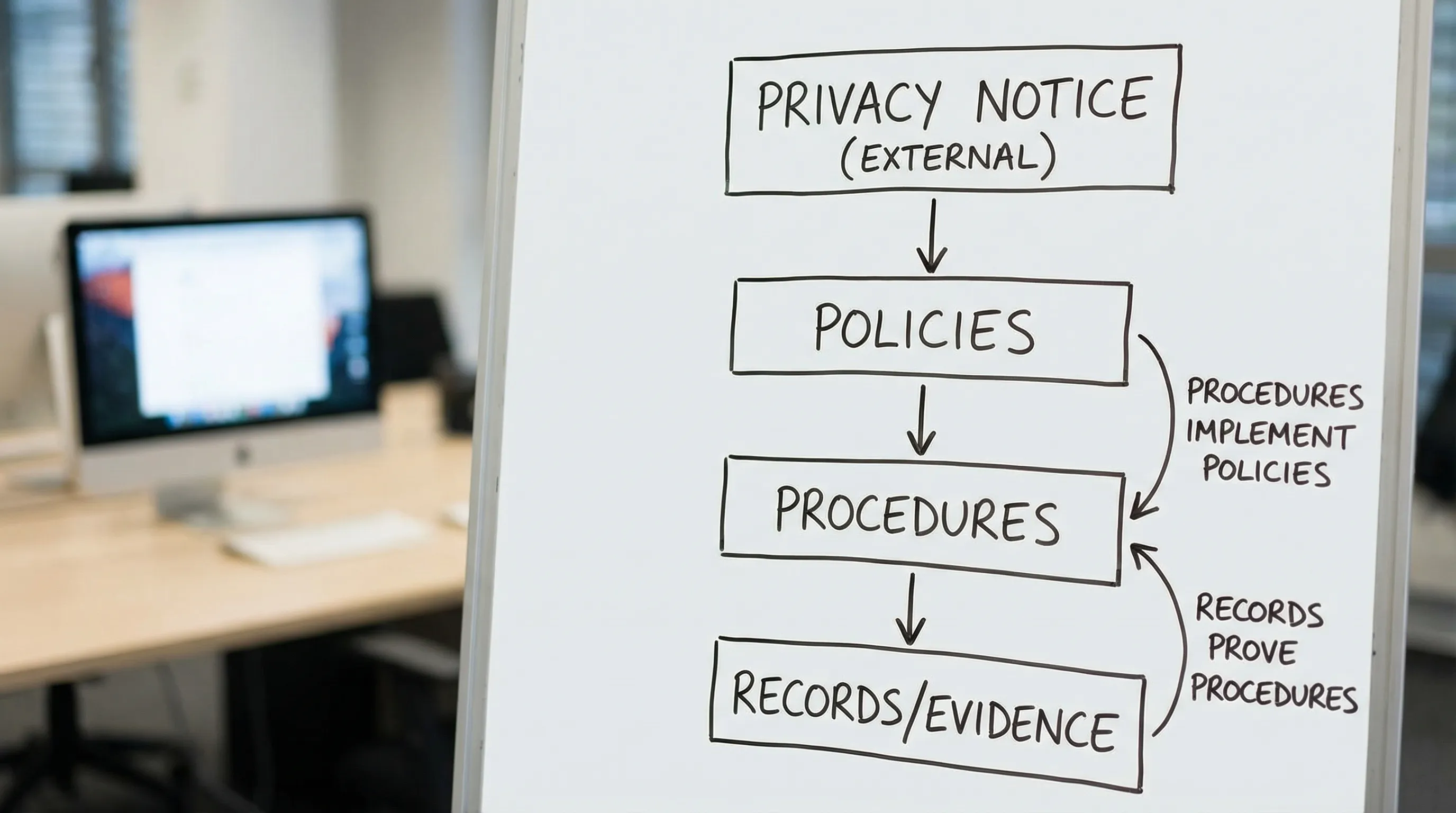
Privacy policy vs procedures: how they should connect
Your privacy notice tells people what you do. Your procedures define how you make that statement true every day.
A practical way to connect them is to treat each major statement in your privacy notice as a “back-office requirement”:
If your notice says you respond to rights requests, you need a rights request procedure and a rights request log.
If your notice says you keep data only as long as necessary, you need a retention schedule and a disposal record (or system evidence).
If your notice says you share data with service providers, you need a vendor list, contracts, and vendor due diligence records.
When these are aligned, your policy becomes credible, and your procedures become purposeful.
How to write a compliance-ready privacy notice (without copying generic templates)
A privacy policy that documents compliance should reflect your real operations. Generic copy-paste language is risky because it creates commitments you may not meet.
At a minimum, ensure your privacy notice clearly explains:
What personal data you collect (categories, and sensitive data if applicable)
Why you collect it (specific purposes)
Your legal basis or justification (expressed in plain language)
Who you share it with (categories of recipients, including service providers)
Whether data goes overseas (and how you manage that risk)
How long you keep it (specific periods or retention criteria)
Individuals’ rights and how to exercise them
How to contact you about privacy concerns
How changes will be communicated
Two drafting tips that prevent common compliance gaps:
Use your data inventory as the source of truth. If a data type is not in your inventory, it probably should not be in your notice.
Avoid absolute promises such as “we never share your data” unless it is verifiably true across all systems and vendors.
How to write procedures that auditors and staff can actually follow
Procedures are often over-written (20 pages, no one reads) or under-written (“handle requests promptly”). A good procedure is short, explicit, and evidence-driven.
Use a standard procedure template
Keep every procedure consistent. A simple structure that works well:
Purpose: What the procedure achieves.
Scope: Which business units, systems, and data it covers.
Roles and responsibilities: Who receives, who approves, who executes.
Inputs and triggers: What starts the process (email, web form, ticket, phone call).
Steps: Clear sequence with timelines.
Evidence to retain: What you will save as proof.
Exceptions: When and how deviations are approved.
Example: Rights request procedure (what to include)
A rights request procedure should document the full lifecycle:
Intake channels (email, form, in person) and how staff recognise a request
Identity verification steps (proportionate to the risk)
Logging requirements (date received, type of request, requester, deadline)
Searching and collecting data across systems
Review and redaction rules (for third-party data)
Approval steps (legal review where needed)
Response format and delivery method
Closure steps and record retention
This procedure produces evidence automatically if you require a log entry and attach outcomes to a ticket.
Example: Incident and breach response procedure (what to include)
A breach procedure should not be limited to cyber incidents. It should cover loss, unauthorised access, misdirection, improper disclosure, and disposal failures.
Document:
How staff report incidents immediately
Who triages (IT, legal, privacy lead)
How severity is assessed (data type, volume, exposure, harm)
Containment steps and investigation
Decision-making for notifications (and who signs off)
Post-incident corrective actions and lessons learned
For internationally recognised structure, you can also align terminology to frameworks like NIST’s incident handling guidance (useful as an operational reference, even where local law governs notification obligations).
The “evidence pack”: what to keep to prove compliance
Policies and procedures are only half of the story. The other half is proof.
Here is a practical mapping you can use to build an evidence pack.
Compliance area | Core document | Evidence to retain (examples) | Typical owner | Review cadence |
Data inventory | Data map / inventory | System list, data flows, updates, sign-off | Privacy lead with IT and business units | Quarterly or when systems change |
Transparency | Privacy notice | Version history, change log, approval record | Legal/Compliance | At least annually |
Individual rights | Rights procedure | Rights request log, response letters, search notes | Customer service + privacy lead | Quarterly trend review |
Security and access | Security policy and access procedure | Access reviews, joiners/movers/leavers tickets | IT/Security | Monthly or quarterly |
Vendor management | Vendor procedure and standards | Due diligence checklist, DP clauses, vendor register | Procurement + legal | Per onboarding, annual review |
Retention and disposal | Retention schedule | Disposal certificates, deletion logs, archive approvals | Records management + IT | Annual and project-based |
Incidents | Incident response procedure | Incident log, investigation reports, corrective action tracker | IT/Security + privacy lead | After each incident + annual test |
Training | Training plan | Attendance sheets, LMS exports, quiz results | HR/Compliance | At least annually |
If you already have a broader checklist, you can use PLMC’s practical privacy and data protection checklist as a starting point, then focus the evidence pack on the documents and records your organisation can maintain consistently.
Document control: the missing piece in many privacy programmes
Documentation fails when:
Staff cannot find the latest version
Procedures are updated but training is not
Ownership is unclear
Review dates are missed
Implement light document control, even if you are not a regulated enterprise with a full quality management system.
Minimum document control rules (that work for SMEs too)
Single source of truth: one repository (SharePoint, GDrive with access controls, or a GRC tool).
Versioning: v1.0, v1.1, v2.0, with a change log.
Approval workflow: name the approver role (not just a person).
Review dates: include “effective date” and “next review date” on every policy and procedure.
Retire old versions: archive them, do not leave them in shared folders.
Make procedures usable
A strong indicator of maturity is whether frontline staff can follow the procedure without calling Legal every time. If they cannot, the procedure is either too vague or too complex.
Practical fixes include:
Provide a one-page “quick guide” for high-volume processes (rights requests, incident reporting)
Add standard email templates and response wording
Define service levels (internal timelines) that match your ability to deliver

How to document compliance when you use many vendors and cloud services
In Jamaica, many organisations rely on international platforms for email marketing, HR, customer support, payments, and analytics. That is normal, but it increases the need for documentation.
At minimum, maintain a vendor register that records:
Vendor name and service
What personal data they process
Purpose and systems involved
Contract status (including data protection clauses)
Security assurances and risk rating
Whether data may be processed outside Jamaica
The goal is not to create busywork. The goal is to be able to answer, quickly and accurately, “who has our data and why?”
Common documentation mistakes (and how to avoid them)
Mistake 1: Your privacy notice does not match reality
This happens when marketing drafts a notice without input from IT, HR, and operations. Fix it by basing disclosures on your data inventory and vendor register.
Mistake 2: Procedures exist, but no one is trained
A procedure without training is not operational. Require training completion for roles that execute the process, then retain evidence.
Mistake 3: You keep policies, but not records
If you cannot show logs, approvals, and outcomes, you are relying on memory. Build logs into day-to-day tools (ticketing systems, shared registers) so evidence is created as work happens.
Mistake 4: No retention schedule, so data lives forever
Even a simple retention schedule is better than none. Start with major categories (HR files, customer records, CCTV, marketing lists) and refine over time.
Mistake 5: No ownership
Every document should have an owner role responsible for updates. “IT owns security” and “HR owns employee privacy notice” are clearer than a generic “Compliance”.
A practical 4-step approach to document compliance (without stalling the business)
Step 1: Confirm scope and build your document list
Decide which data contexts you are covering first: customer, employee, website visitors, suppliers, members, students, patients. Then list your required documents and owners.
Step 2: Build or update your data inventory
Documentation is only accurate if you know what data exists and where it lives. If your inventory is incomplete, your privacy notice and procedures will be incomplete.
Step 3: Draft procedures for the highest-risk, highest-frequency activities
Most organisations should prioritise:
Rights requests
Incident and breach response
Vendor onboarding
Retention and disposal
Step 4: Create the evidence pack folder structure and start logging
Do not wait until “everything is perfect.” Start recording:
Rights request log entries
Incident log entries
Vendor due diligence results
Training completion
Within a few weeks, you will have early proof that your programme is real.
Frequently Asked Questions
What is the difference between a privacy policy and procedures? A privacy policy (or privacy notice) explains to individuals how you handle their personal data. Procedures are internal instructions that staff follow to deliver what the policy promises, such as how to handle rights requests, incidents, retention, and vendor management.
How do we “prove” compliance under the Data Protection Act? You prove compliance with a combination of documented policies and procedures plus records that show they are being followed. Examples include a rights request log, incident log, training records, vendor register, and approved privacy notices.
Do small businesses in Jamaica really need formal documentation? Yes, but it should be proportionate. A small business can use shorter policies and simpler logs, but it still needs clarity on what data it holds, why it holds it, how it secures it, and how it responds to requests or incidents.
How often should we review privacy policies and procedures? At least annually, and whenever there is a significant change such as a new system, a new vendor, a new type of data collected, or a material incident.
Can we use a GDPR template privacy policy for Jamaica? Templates can help with structure, but copy-paste policies are risky. Your notice and procedures must match your actual data processing, your vendors, and your local legal obligations.
Need help documenting compliance in a way that stands up to scrutiny?
PLMC supports organisations in Jamaica with data protection implementation, training, and practical compliance documentation that teams can actually use. If you want to build or tighten your privacy policy and procedures, and assemble an evidence pack that demonstrates accountability, you can start with a free consultation via Privacy & Legal Management Consultants Ltd..