

Data Protection and Security: How to Align People, Process, Tech

Most organisations don’t struggle with knowing they need data protection and security. They struggle with making it work in the real world, where staff are busy, processes are inconsistent, and technology stacks are stitched together over time.
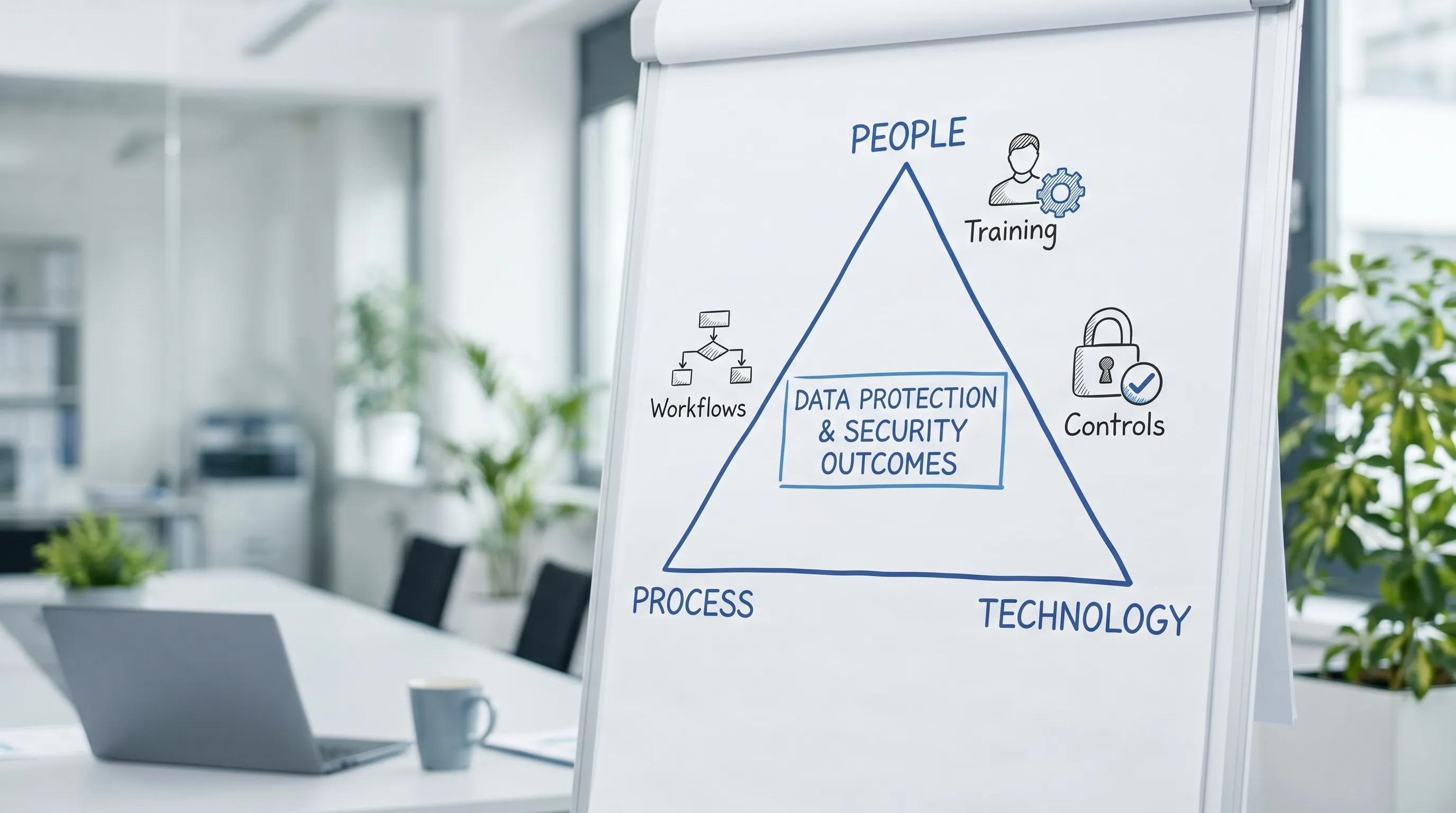
The fix is not “buy a tool” or “run a training”. It is alignment: people, process, and technology working toward the same outcomes, using the same language of risk, and producing the evidence you need for compliance.
What “alignment” actually means in data protection and security
Alignment is the practical link between:
People (roles, behaviours, accountability, decision-making)
Process (how work gets done, how data flows, how exceptions are handled)
Technology (the controls that enforce and record what you say you do)
When these three drift apart, you see common symptoms:
Policies exist, but staff do not follow them (or do not understand them).
Security tools are deployed, but processes do not use them (or bypass them).
You can’t produce evidence quickly when leadership, auditors, or regulators ask.
Incidents repeat because the root cause is not addressed (training alone, or tech alone).
In Jamaica, where the Data Protection Act, 2020 raises expectations for governance and safeguards, alignment becomes a compliance issue as well as an operational one. (If you need a broader compliance view, see PLMC’s Data Protection Jamaica: Compliance Roadmap for 2026.)
Start with shared outcomes (not tools)
Before you review controls or rewrite policies, define the outcomes you want. For most organisations, these outcomes are stable across industries:
Reduce likelihood and impact of data breaches
Prevent unauthorised access and disclosure
Maintain availability of critical systems and records
Demonstrate compliance (documentation, logs, training records, vendor due diligence)
Handle personal data responsibly across its lifecycle (collection to disposal)
A useful way to structure this is with a recognised framework that bridges security and governance, such as:
The NIST Cybersecurity Framework (CSF) 2.0 (govern, identify, protect, detect, respond, recover)
ISO/IEC 27001 (information security management system)
The CIS Critical Security Controls (prioritised technical safeguards)
You do not need to “implement everything”. The value is in using a common structure so people, process, and tech decisions are made consistently.
People alignment: make accountability real
Security and privacy programmes fail quietly when accountability is theoretical. A policy that says “users must…” without a named owner, workflow, and enforcement point becomes a suggestion.
Clarify roles and decision rights
At minimum, align these roles (titles vary by organisation):
Executive sponsor: sets priority, approves risk appetite, funds the programme
Privacy lead / DPO function (formal or informal): advises on obligations, rights handling, privacy by design
Security lead: manages cybersecurity risk, controls, monitoring, incident response
System owners: accountable for controls inside their platforms and business processes
HR and procurement: critical for onboarding, offboarding, training, and vendor governance
If you only do one thing, define who can approve:
Access to sensitive systems
Exceptions (for example, using personal email, exporting data, bypassing MFA)
Vendor engagement that involves personal data
Build competence where it matters (role-based training)
General awareness training is necessary but rarely sufficient. Alignment improves when training matches the real tasks people perform.
Examples of role-based focus:
Customer service: identity verification, handling access or correction requests, avoiding over-disclosure
HR: staff records, medical information, retention, secure sharing with third parties
Finance and AML teams: minimisation, secure evidence handling, retention and audit trails
IT and developers: secure configuration, logging, least privilege, privacy by design
Training should also produce evidence: attendance, completion, assessment results, and refresher cadence.
Reinforce behaviour through leadership and routine
Culture is not posters. Culture is what gets praised, what gets corrected, and what gets measured. Simple reinforcement mechanisms often outperform big campaigns:
Managers discuss one “data handling moment” in monthly team meetings
“Privacy and security champions” in each department escalate issues early
Post-incident reviews focus on process fixes, not only blame
Process alignment: design the workflows your controls depend on
Many organisations have controls but no consistent processes to activate them. Process alignment turns policy into repeatable action.
Map the data lifecycle (so you know where controls must exist)
A practical lifecycle view:
Collection (forms, calls, web portals, third-party sources)
Use (case management, HR systems, finance systems, analytics)
Sharing (vendors, regulators, parent companies, cloud platforms)
Storage (on-prem, cloud, laptops, email, shared drives)
Retention and disposal (archiving, deletion, secure destruction)
Once you map this, you can spot the “high-risk moments”: exports to spreadsheets, email attachments, WhatsApp sharing, unmanaged devices, shared accounts, and vendor handoffs.
Embed privacy and security into everyday workflows
Alignment improves when the secure option is the easiest option.
Examples of process “anchors” that make controls stick:
Access request and approval workflow tied to job role, with periodic access reviews
Joiner-mover-leaver process (onboarding, role changes, offboarding) that reliably updates access
Change management so system changes do not quietly remove logging or weaken authentication
Incident response workflow with clear triggers, escalation paths, and evidence capture
Vendor onboarding that includes due diligence, contract requirements, and review cadence
If you want a broader programme checklist, PLMC’s Privacy and Data Protection: A Practical Checklist provides a strong starting point.
Technology alignment: choose controls that support the process
Technology should do two jobs:
Prevent or reduce likelihood (for example, MFA, least privilege, encryption)
Prove what happened (for example, logs, audit trails, monitoring)
A common misalignment is when tools exist but are not connected to process. For example, an organisation buys endpoint protection, but devices are not inventoried, updates are unmanaged, and alerts are not assigned to an accountable team.
Control areas that usually deliver the biggest risk reduction
Without assuming a specific stack, most organisations benefit from prioritising:
Asset and access management: inventory, unique accounts, strong authentication (including MFA where appropriate), least privilege
Secure configuration and patching: defined baselines, update SLAs, vulnerability management
Encryption and key handling: protect data at rest and in transit, manage keys securely
Backups and recovery: tested restore processes, ransomware resilience
Logging and monitoring: centralised logs for critical systems, alert triage and response procedures
Data handling controls: classification, secure sharing methods, reducing uncontrolled exports
These controls become far more effective when your processes specify who reviews logs, who approves access, what “urgent” means, and how exceptions are recorded.
A practical alignment playbook (people, process, tech in one view)
You can use the following sequence to bring alignment to life without turning it into a massive multi-year project.
Align on your “crown jewels” and risk appetite
Identify the systems and datasets that would cause the most harm if exposed, altered, or unavailable. In Jamaica, common examples include:
Customer identity data
Employee records
Payment and banking information
Health information
Student and child data
Then define risk appetite in plain terms: what is unacceptable, what is tolerable with controls, and what must be escalated.
Assign owners to risks, not just systems
Make accountability explicit. For example:
“Customer database access is reviewed quarterly” needs an owner, schedule, and evidence.
“Vendor due diligence is completed before data sharing” needs a gate in procurement.
Document and test the critical workflows
Pick a small number of workflows that create most of the exposure, then standardise them:
Access request and removal
Vendor onboarding for data processors
Incident escalation and internal reporting
Handling data subject rights requests
Implement controls that enforce the workflow
Once the workflow is stable, implement controls that make it hard to bypass:
Role-based access controls aligned to HR roles
Approved secure sharing methods (instead of ad hoc email forwarding)
Centralised logging for the most sensitive systems
Automated offboarding steps where possible
Produce evidence as a by-product of doing the work
Aim for “compliance evidence by design”:
Access approvals and reviews (records)
Training completion reports
Vendor assessments and contract clauses
Incident tabletop results and improvements
System logs, change records, backup tests
Measure what matters and report it simply
If leadership only sees compliance as cost, alignment will fade. Metrics make progress visible.
Mapping risks to people, process, and tech (with evidence)
Use a table like this to keep alignment concrete and auditable.
Common risk scenario | People control | Process control | Technology control | Evidence to keep |
Unauthorised access to staff or customer records | Role clarity, onboarding training, confidentiality commitments | Access request, approvals, quarterly access reviews, offboarding checklist | MFA, least privilege roles, audit logs | Approval records, access review reports, log extracts |
Data shared with a vendor without safeguards | Procurement training, clear approval authority | Vendor due diligence workflow, contract review, periodic vendor reviews | Restricted sharing channels, encrypted transfer where needed | Due diligence notes, signed DPA clauses, sharing records |
Ransomware or major outage | Incident roles, simulation participation | Backup and recovery plan, incident response runbooks | Immutable backups where feasible, endpoint protection, monitoring | Restore test results, incident tabletop notes, backup reports |
Sensitive data leaks via email or spreadsheets | Awareness focused on real scenarios | Approved sharing methods, data handling standards | Encryption in transit, access controls, logging | Policy acknowledgements, audit trails, exception register |
Slow or inconsistent rights request handling | Frontline training, clear escalation | Rights request intake and tracking workflow | Ticketing or case tracking tool (even basic) | Request logs, response timelines, decision records |
Metrics that show alignment (and where misalignment hides)
A good measurement set mixes privacy, security, and operational indicators.
Area | Example metric | What it tells you |
Training effectiveness | Completion rate plus short assessment scores | Whether learning is retained, not just attended |
Access governance | % of privileged accounts reviewed on schedule | Whether access process is actually happening |
Vulnerability and patching | Patch SLA adherence for critical systems | Whether technical hygiene matches stated policy |
Incident readiness | Time to escalate internally, tabletop action closure rate | Whether response process is usable under pressure |
Rights handling | Average time to acknowledge and resolve requests | Whether privacy operations are functioning |
Common misalignment patterns (and quick fixes)
“We have policies” but staff still use WhatsApp and personal email
Policies must be paired with an approved, convenient alternative. If the secure channel is slow or complicated, people will route around it.
Quick fix: define approved sharing tools and file-handling rules, then train teams using their real workflows.
Security sits in IT, privacy sits in legal, and they rarely meet
This creates gaps in vendor management, incident response, and change management.
Quick fix: establish a joint monthly forum for privacy and security risk decisions with shared reporting to leadership.
Tools generate alerts, but no one owns triage
Alert fatigue becomes silent risk.
Quick fix: define severity levels, response times, and a named owner per alert category, even if you start with only critical systems.
“Compliance” is a project instead of a capability
Programmes fade after the initial push.
Quick fix: build recurring routines, quarterly access reviews, annual training refreshers, vendor review cycles, and regular incident simulations.
Frequently Asked Questions
What is the difference between data protection and data security? Data protection is the broader discipline covering lawful, fair handling of personal data (including rights, purpose limits, retention, and governance). Data security focuses on protecting confidentiality, integrity, and availability using administrative, physical, and technical safeguards. You need both.
Do we need expensive tools to improve data protection and security? Not always. Many gains come from aligning roles, tightening workflows (access, vendors, incidents), and configuring existing systems correctly. Tools help most when they enforce a clear process.
How do we align privacy and cybersecurity teams? Use shared risk language, agree on critical datasets and systems, define joint workflows (incident response, vendor onboarding, change management), and report combined metrics to leadership.
What should a small Jamaican business prioritise first? Start with data inventory for key systems, access control and MFA where appropriate, basic incident readiness, vendor due diligence, and role-based training. Keep evidence as you go.
How can we demonstrate compliance without creating mountains of paperwork? Design workflows that automatically produce evidence, such as access approvals, training reports, vendor review records, and incident tabletop notes. Evidence should be a by-product of operations.
Build alignment with practical support
If you want to reduce risk and meet expectations under Jamaica’s Data Protection Act, the fastest path is usually a focused alignment effort: clarifying accountability, tightening the workflows that handle personal data, and implementing controls that support those workflows.
Privacy & Legal Management Consultants Ltd. (PLMC) supports Jamaican organisations with data protection implementation, cybersecurity services, GRC integration, training, and risk assessment approaches.
Learn more about PLMC at Privacy & Legal Management Consultants Ltd., or explore these resources to strengthen your programme: