
Data Privacy Practices: A Playbook for SMEs

Most SME privacy problems are not caused by “hackers in hoodies”. They happen in ordinary moments: a staff member emails a spreadsheet to the wrong person, customer records sit in an unlocked Google Sheet, a phone with WhatsApp chats gets lost, or an old laptop is sold without wiping the drive.
In Jamaica, the expectations are rising under the Data Protection Act and public awareness of privacy is growing. The good news is that strong data privacy practices do not require enterprise budgets. They require a repeatable routine.
This playbook is designed for Jamaican SMEs that want practical, defensible privacy habits, without turning the business into a paperwork factory.
What “good” looks like for an SME
A workable privacy programme for a small or medium-sized business should deliver a few outcomes consistently:
You can explain what personal data you hold, why you hold it, where it is stored, and who can access it.
You collect only what you need, keep it only as long as you need, and delete or anonymise it safely.
Your team knows the “do’s and don’ts” for everyday handling (email, WhatsApp, paper forms, USB drives, customer calls).
You can respond calmly to common events: a customer asks for their information, a vendor needs access, or a device goes missing.
You can show evidence (not just intentions) if a client, regulator, bank, or business partner asks.
If you want a deeper grounding in the law and key terms (controller, processor, personal vs sensitive data), pair this article with PLMC’s guide: Data Protection Basics: What Jamaican Firms Must Know.
The SME data privacy playbook (7 practices that actually stick)
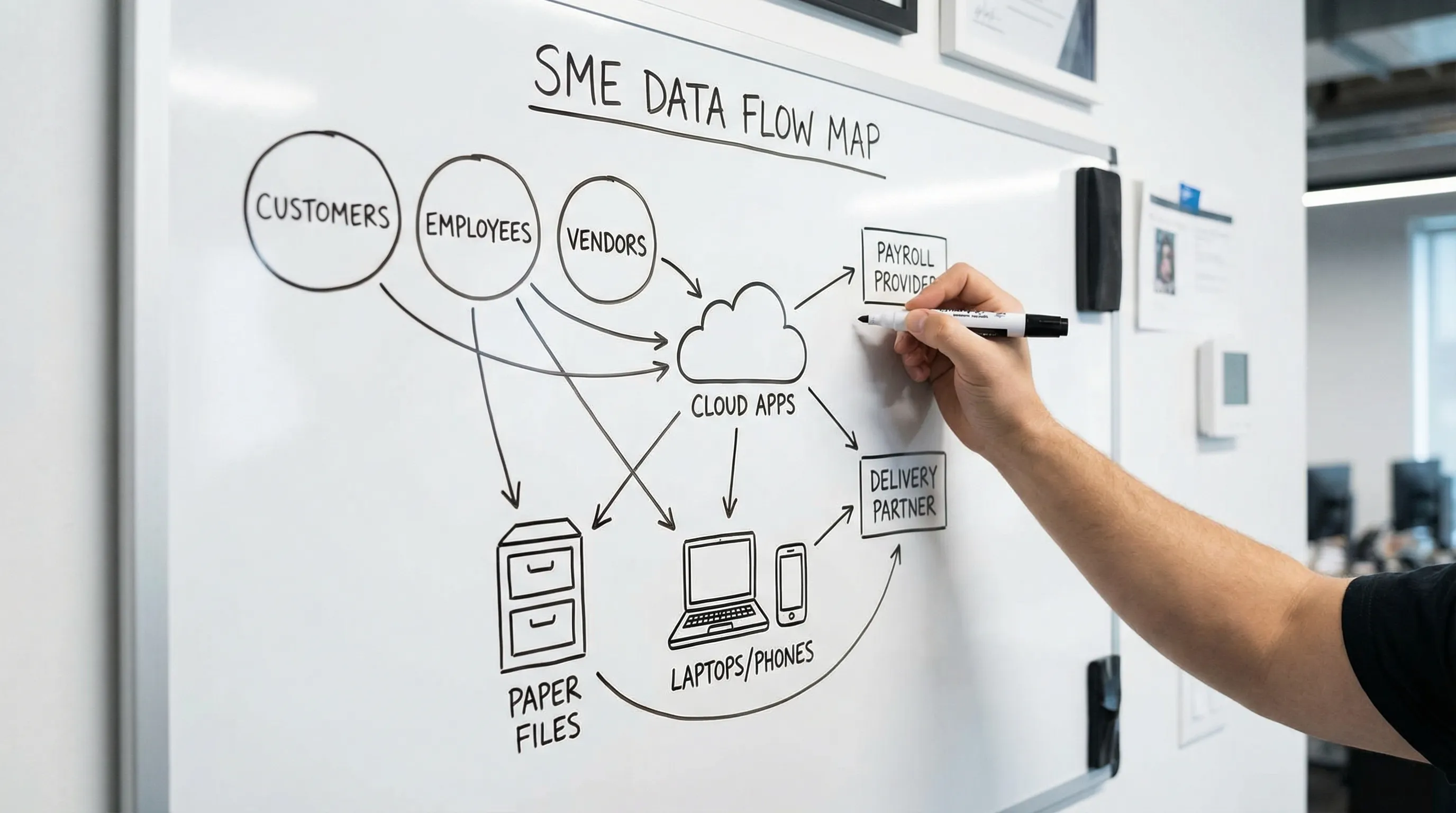
1) Map your personal data in plain language
If you only do one thing this month, do this. You cannot protect what you cannot find.
Create a simple data map (one spreadsheet is fine) that answers:
What personal data do we collect?
From whom (customers, staff, suppliers, visitors, patients, students)?
Why do we use it?
Where is it stored (paper, email, laptop, HR system, accounting tool, cloud drive)?
Who has access?
How long do we keep it?
Who else receives it (banks, payroll providers, delivery partners, insurers, marketing platforms)?
Keep it practical. Use business language, not legal language.
Here is a starter view of what many Jamaican SMEs handle and the controls that matter most:
Data type (examples) | Where SMEs often store it | Typical risk | Practical control to start with |
Customer contact info (name, phone, email, address) | Email, POS/CRM, WhatsApp, spreadsheets | Oversharing, wrong recipient, unauthorised access | Limit who can export lists, add basic sharing rules, use role-based access |
Government IDs (TRN, passport, driver’s licence) | Scanned PDFs, staff phones, HR folders | Identity fraud, high impact exposure | Restrict access, encrypt storage, avoid sending via WhatsApp unless necessary |
Employee HR files (contracts, leave, disciplinary records) | Shared drive, filing cabinet | Internal misuse, leakage | Separate HR folder with limited access, lock cabinets, audit access |
Financial data (bank details, invoices, card-related info) | Accounting app, email, paper | Fraud, phishing, charge disputes | MFA on email and finance tools, call-back verification for bank changes |
Health-related data (if applicable) | Forms, email attachments | High sensitivity, reputational harm | Tight access, clear purpose, retention schedule, secure disposal |
If you want a structured checklist to compare against, PLMC also provides a practical reference here: Privacy and Data Protection: A Practical Checklist.
2) Put boundaries around collection (minimise by default)
SMEs often collect extra fields “just in case”. Over time that becomes a liability you must secure, retain, and possibly disclose.
Make minimisation a default habit:
Review every form (paper and online) and remove fields you do not truly need.
Separate “required” and “optional” fields, and explain why you need the required ones.
Avoid copying IDs unless a real business need exists. If you must, store securely and restrict access.
Train staff to stop “collecting on instinct”, especially on calls or in-store.
A useful mindset is: If we do not need it to deliver the service, comply with a legal obligation, or protect the business, we should not collect it.
3) Make transparency easy (privacy notices that people can understand)
Privacy notices are not just a compliance checkbox. They reduce complaints because customers and staff understand what is happening.
For an SME, your privacy communication should cover:
What you collect and why
Who you share it with (categories are acceptable in many cases)
How long you keep it (even if it is a range)
How people can contact you about their data
Key security expectations (for example, you will not ask for passwords)
Practical tip: keep a short “front-of-house” version (website, reception, registration desk) and a longer internal version for HR and operations.
4) Control access (privacy is mostly an internal discipline)
Many incidents are not malicious. They are “too many people have access” problems.
Start with three rules:
Least privilege: staff access only what they need for their role.
No shared logins: individual accounts are safer and easier to audit.
Offboarding is a same-day task: when someone leaves, remove access immediately (email, cloud drives, WhatsApp groups where feasible, shared folders, banking portals).
If you use shared drives or cloud folders, implement a simple access structure: “Everyone”, “Team”, and “Restricted” (HR, Finance, Legal). Then enforce it.
5) Secure the basics (high impact, low drama)
You do not need a complex cyber programme to improve privacy, but you do need baseline security hygiene. The CIS Critical Security Controls are a widely used, practical framework for prioritising controls, especially for smaller organisations (Center for Internet Security).
For most SMEs, the highest ROI actions are:
Turn on multi-factor authentication (MFA) for email, cloud storage, payroll, accounting, and admin accounts.
Keep devices and software patched (set updates to automatic where possible).
Use encrypted storage for sensitive files (many modern devices support this, but it must be enabled and managed).
Maintain reliable backups (including at least one offline or separated backup) and test restoration.
Reduce phishing risk with short, repeated training and a clear “report suspicious email” process.
Security and privacy are linked: if you cannot prevent unauthorised access, you cannot claim you are protecting personal data.
6) Manage vendors like you would manage staff
SMEs outsource a lot: payroll, bookkeeping, marketing, web hosting, courier services, cloud software. That does not outsource your responsibility.
Build a lightweight vendor routine:
Keep a vendor list that shows who touches personal data.
Ask a few consistent questions before onboarding:
What data will you access and why?
How do you secure it (MFA, encryption, access controls)?
Do you use subcontractors?
How do you report incidents?
Put key expectations in writing (confidentiality, security, breach notification timelines, return or deletion on termination).
If you rely heavily on cloud services, pay attention to where data may be stored or accessed from. Cross-border data handling can raise additional compliance considerations, so keep it visible in your data map.
7) Build a calm, repeatable incident response habit
A privacy incident is not always a “breach” in the cinematic sense. It can be:
A misdirected email attachment
A lost phone or laptop
A staff member viewing records they should not
A hacked mailbox used to request fraudulent payments
Your first goal is speed and containment. Your second goal is documentation.
Use a simple incident log that captures:
Date/time detected
What happened (facts, not guesses)
Systems and data involved
What you did to contain it
Who was informed and when
Lessons learned and changes made
For a credible, industry-recognised approach, see NIST SP 800-61 (Computer Security Incident Handling Guide). You do not need to implement it fully, but it is a strong reference for what “good” looks like.
The operating rhythm: turn privacy into routine
Most SMEs fail at privacy because it is treated as a once-a-year policy exercise. Strong data privacy practices are closer to finance controls: small, repeated actions.
Here is a rhythm that works in real businesses:
Frequency | What to do | Outcome |
Daily | Use MFA, lock screens, double-check recipients before sending files, avoid sharing sensitive docs over personal channels | Fewer preventable incidents |
Weekly | Review new staff access requests, check shared drive permissions, confirm backups ran successfully | Access stays tight, recovery stays possible |
Monthly | Spot-check a process (customer onboarding, HR file handling, marketing list use), log any issues and fixes | Continuous improvement without overload |
Quarterly | Update your data map, review key vendors, run a short incident tabletop (30 minutes) | You stay ready as the business changes |
This routine also creates evidence, which matters for accountability.

Common SME pitfalls (and easy fixes)
“We use WhatsApp for everything”
WhatsApp is convenient, but it can become an uncontrolled record system on personal devices.
Fix:
Decide what is allowed on WhatsApp (for example, appointment confirmations) and what is not (IDs, health details, payroll records).
Move sensitive exchanges to controlled channels (secure email, portal, or a business-managed device).
Set a retention habit: move customer data into your official system, then delete the chat thread where appropriate.
“Our customer list is on one spreadsheet that everyone can access”
This is common, and risky.
Fix:
Make a master list restricted to a small group.
Give teams filtered lists that match their function (sales, delivery, support).
Stop uncontrolled exporting by using a CRM/POS permission model where possible.
“We keep records forever”
Over-retention increases breach impact and costs time in searches and disclosures.
Fix:
Define retention rules for your top 10 record types (HR, payroll, invoices, customer files, CCTV if applicable).
Schedule quarterly deletion or archiving.
Ensure paper disposal is secure (shredding, locked disposal bins).
“Privacy is the admin’s job”
Privacy is operational. The highest-risk actions are often performed by frontline staff.
Fix:
Assign a clear owner (not necessarily a full-time role).
Create one page of “privacy rules for our business”, written in plain English.
Run short training refreshers focused on real scenarios (misdirected emails, phone loss, customer requests).
The evidence pack: what to keep so you can prove compliance
Even a small business should be able to show basic documentation. This is not bureaucracy, it is protection.
Aim to maintain:
A current data map (your processing inventory)
Privacy notices (customer-facing and HR)
A list of key vendors that handle personal data
Access control records (who has admin access, who can export lists)
Incident log (even for near-misses)
Training records (dates, attendees, topics)
Retention schedule and disposal method
If you are building toward a more formal 2026-ready programme, PLMC’s planning guide can help you structure deliverables over time: Data Protection Jamaica: Compliance Roadmap for 2026.
When to get expert help (and what to ask for)
You can start this playbook internally, but it is worth bringing in support when:
You process sensitive data (health-related, children’s data, extensive ID data)
You are onboarding new systems (CRM, HR platform, cloud migration)
You have had an incident, complaint, or near-miss
A client or partner asks for proof of your controls
When you speak with a consultant, ask for practical outputs, not just policies:
A tailored data map and risk assessment
A workable retention schedule
Staff training that matches your workflows
Vendor and cross-border risk review
Incident response procedures that your team will actually follow
Privacy & Legal Management Consultants Ltd. (PLMC) supports Jamaican organisations with data protection implementation, training, and risk assessment tools. If you want to turn this playbook into a programme that fits your operations, you can start with a conversation via the resources on Privacy & Legal Management Consultants Ltd..
A simple way to start this week
Pick one customer journey (for example: request, quote, delivery, after-sales support). Map where personal data appears at each step, then apply three controls:
Reduce what you collect
Reduce who can access it
Reduce how long you keep it
Do that for one journey per month, and within a quarter your data privacy practices will be noticeably stronger, easier to explain, and far more defensible if questions arise.