

Data Privacy Assessment: How to Run One Without Overcomplicating

A data privacy assessment is one of the fastest ways to get clarity on where your organisation stands, what risks matter most, and what you should fix first. It does not have to turn into a months-long audit, a massive spreadsheet, or a perfect data map before you can take action.
If you operate in Jamaica, a practical assessment is also one of the simplest ways to evidence accountability under the Data Protection Act, 2020. The goal is not to produce paperwork for its own sake, it is to reduce real privacy, security, and compliance risk.
What a “data privacy assessment” should mean (in plain language)
A data privacy assessment is a structured check of how personal data is collected, used, shared, stored, and secured across your business, and whether your practices align with your legal obligations and your own policies.
Done well, it answers four executive-level questions:
What personal data do we have and why do we have it?
Where are the highest-risk activities (people, process, technology, third parties)?
What evidence do we have that controls exist and are working?
What are the top actions for the next 30 to 90 days?
This is different from a full legal review of every clause in every contract, and it is different from a deep technical penetration test. It is a risk-based snapshot that is detailed enough to drive decisions.
When to run one (and when not to)
A lightweight assessment is most useful when:
You are building (or rebuilding) your privacy programme.
A partner, regulator, or customer is asking for assurance.
You have had a recent incident, near miss, or complaint.
You are onboarding new systems (HRIS, CRM, patient system, learning platform).
You are outsourcing processing (payroll, cloud hosting, call centre, marketing).
If you are introducing a genuinely high-risk activity (for example, large-scale sensitive data, tracking and profiling, biometrics, or new surveillance-style monitoring), you may need a more formal impact assessment approach. A standard assessment can still be your first step, it helps you decide whether deeper analysis is required.
The “do not overcomplicate” approach: 7 steps that work
The fastest way to overcomplicate a privacy assessment is to start by trying to document everything. Instead, start by scoping, then work from highest-risk processing down.
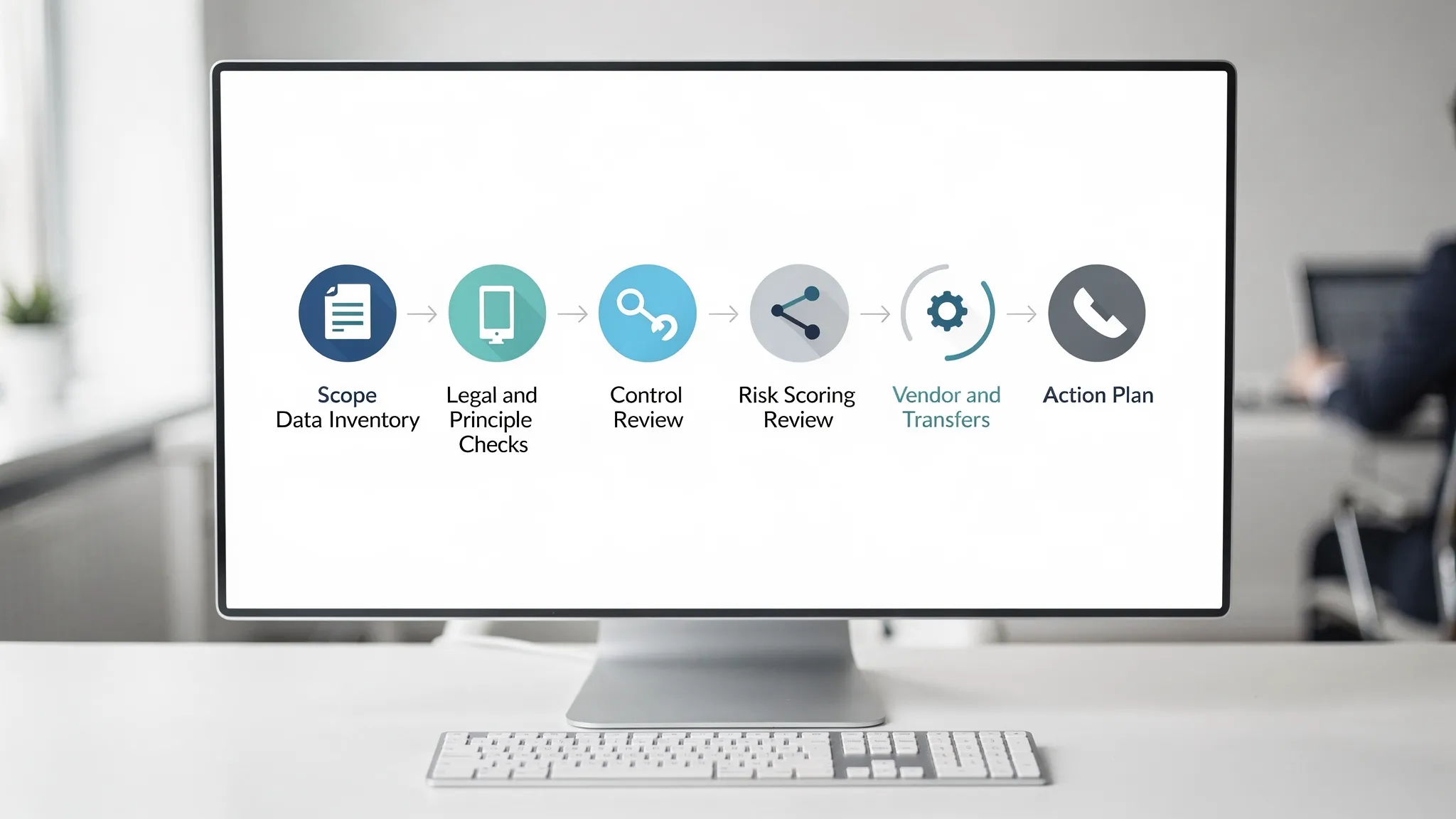
Step 1: Define scope in one page
Write a short scope statement that answers:
Business units: Which departments are in scope (HR, Sales, Operations, IT)?
Systems: Which key systems store or process personal data?
Data types: Do you handle children’s data, health data, financial data, ID numbers?
Timebox: When will the assessment start and finish?
A useful rule for a first assessment: pick 5 to 10 processing areas that represent most of your risk, rather than chasing complete coverage on day one.
Step 2: Build a “good enough” data inventory
You do not need a perfect enterprise data map to start managing risk. For each in-scope activity, capture the minimum viable inventory:
Purpose (why you process it)
Categories of personal data
Whose data it is (employees, customers, students, patients, vendors)
Where it comes from and where it goes (internal teams, service providers)
Storage locations (systems, shared drives, paper files)
Retention expectation (how long you keep it, and why)
If you already have a checklist-based programme, connect this step to it. PLMC’s article, Privacy and Data Protection: A Practical Checklist, pairs well with an assessment because it clarifies what “good” evidence can look like.
Step 3: Run a quick principle-based compliance check
Instead of quoting legislation line-by-line, assess each processing activity against the principles your organisation should already be aligning to (fairness, transparency, purpose limitation, minimisation, accuracy, storage limitation, security, accountability).
If your team needs a refresher on the principles and individual rights under Jamaican law, this guide can help: Data Privacy in Jamaica: Key Principles and Rights.
Practical output for this step: note where you lack a privacy notice, where data collected is not clearly necessary, and where retention is “we keep it forever”. Those are usually quick wins.
Step 4: Validate controls using evidence, not opinions
Assessments fail when they rely on informal answers like “IT has that covered” or “HR usually handles it”. Ask for a small set of proof items.
Use the table below as a simple evidence guide.
Assessment area | What you are checking | Examples of evidence to request |
Governance and accountability | Ownership, reporting lines, policies, decision-making | Assigned responsibilities, privacy policy, internal standards, meeting notes or risk reports |
Transparency and notices | People are informed in clear language | Website/app privacy notice, employee notice, consent records (if used) |
Rights handling | Requests can be received, verified, tracked, answered | Request log, SOP, response templates, training notes |
Data minimisation and retention | You only collect what you need and keep it for defined periods | Forms review, retention schedule, deletion process, archive rules |
Security controls | Appropriate safeguards are in place for confidentiality and integrity | Access control rules, MFA policy, joiner-mover-leaver process, backup approach |
Incident readiness | You can detect, triage, and respond consistently | Incident response plan, contact tree, tabletop exercise notes |
Third-party management | Vendors are assessed and contracted appropriately | Vendor register, due diligence records, data protection clauses, DPAs |
Cross-border transfers (if applicable) | You understand where data is stored and accessed | Cloud architecture notes, vendor locations, transfer assessment notes |
Keep the evidence request proportional. For a small business, “evidence” might be a single policy plus screenshots of access settings and a vendor list. That is still better than a 60-page report with no operational proof.
Step 5: Focus on vendors and cloud early (it is where risk hides)
Many Jamaican organisations rely heavily on outsourced services for payroll, email, file storage, marketing, customer support, and payments. A simple vendor review often surfaces the biggest gaps quickly.
At minimum, confirm:
Who your processors/service providers are (create a vendor register).
What data they handle and for what purpose.
Whether the contract addresses confidentiality, security expectations, and breach notification.
Whether you know where data is hosted and who can access it.
If you are mid-transition to compliance, PLMC’s Data Protection Jamaica: Compliance Roadmap for 2026 gives a useful quarter-by-quarter structure you can use to sequence vendor governance and operational controls.
Step 6: Score risk simply, then prioritise
You do not need complex formulas. Use a consistent method that your leadership understands.
A common approach is Impact x Likelihood, scored 1 to 3 (or 1 to 5). Define the meaning of scores in writing so they are repeatable.
Score | Likelihood (example definition) | Impact (example definition) |
1 | Unlikely, strong controls in place | Limited harm, low sensitivity, contained |
2 | Possible, some controls but gaps exist | Moderate harm, sensitive data involved or broader exposure |
3 | Likely, weak controls or frequent issues | Serious harm, high sensitivity, large scale, regulatory and reputational impact |
Then sort findings into “fix now”, “plan next”, and “monitor”. The value of the assessment is not the score, it is the prioritised action list that follows.
Step 7: Produce three deliverables (and stop)
To avoid report bloat, aim to publish only:
Executive summary (1 to 2 pages): top risks, top recommendations, resourcing needs.
Findings and risk register: each issue, affected process/system, risk rating, evidence, owner.
30 to 90 day action plan: actions, deadlines, owners, and what “done” means.
If you cannot link a finding to a named owner and a next action, it is usually not ready to be in the final report.
Common ways teams accidentally overcomplicate assessments
Trying to map every piece of data before taking action
A full data map is a valuable long-term asset, but it is not a prerequisite for risk reduction. Start with critical processes (HR, customer onboarding, payment flows, marketing lists), then expand.
Turning it into a one-person project
Privacy assessments work best when they are facilitated, but owned by the business. Each finding should have an operational owner, not just “Compliance”.
Treating it as a checkbox exercise
If the assessment only produces documents, it will not change outcomes. Include a short session at the end to agree priorities, budget implications, and timelines.
Ignoring paper records and shared drives
In many organisations, high-risk data still lives in email inboxes, WhatsApp threads, shared drives, and filing cabinets. Your assessment should explicitly check those realities.
A practical timeline you can copy
Most organisations can complete a first-pass assessment quickly if scope is controlled:
Organisation type | Typical scope | Realistic timeline |
Small business (single site) | 5 to 7 processes, top 5 vendors | 2 to 3 weeks |
Mid-sized organisation | 8 to 12 processes, key systems, vendor set | 3 to 6 weeks |
Regulated or multi-site | More systems, more vendors, more evidence | 6 to 10 weeks |
The biggest variable is not size, it is availability of process owners and how quickly evidence can be collected.

Frequently Asked Questions
How often should we run a data privacy assessment? Many organisations do a light annual assessment, plus targeted assessments when launching new systems, changing vendors, or after an incident.
Is a data privacy assessment the same as a DPIA? Not always. A privacy assessment is a broad, risk-based health check of your programme. A DPIA (data protection impact assessment) is typically deeper and used for specific high-risk processing.
Who should lead the assessment internally? Usually a compliance, legal, risk, or IT security lead facilitates it, but each process should be assessed with the business owner (HR, Operations, Sales) present to confirm reality and agree actions.
What is the minimum evidence we should keep after the assessment? Keep the scope statement, findings and risk register, action plan, and the key supporting evidence you relied on (policies, vendor register, incident plan, rights SOP).
Do we need special software to run a data privacy assessment? No. Many organisations start with a structured worksheet and a risk register. The important part is consistency, evidence, and follow-through.
What if the assessment shows major gaps? That is normal, especially early on. Use the results to prioritise high-impact fixes first (vendor controls, access management, notices, retention, incident readiness), then build toward maturity.
Need a simple, defensible assessment for your organisation?
PLMC supports Jamaican organisations with data protection implementation, risk assessment tools, training sessions, and practical compliance guidance aligned with the Data Protection Act. If you want an assessment that is thorough but not overcomplicated, you can start with a free consultation and map out scope, evidence needs, and a 30 to 90 day plan.
Learn more at Privacy & Legal Management Consultants Ltd..