

Cyber Data Protection: Controls That Reduce Real Risk

Most data breaches are not caused by “unknown zero-days.” They happen because everyday controls were missing or inconsistent: no multi-factor authentication, weak vendor access, unpatched systems, unclear ownership, or backups that cannot be restored when it matters.
For Jamaican organisations working to meet expectations under the Data Protection Act, cyber data protection is not a separate project from privacy compliance. It is the set of controls that makes your privacy promises real.
This guide focuses on controls that reliably reduce real risk, meaning they interrupt common attack paths, protect personal data where it actually lives, and produce evidence you can defend to leadership, customers, and regulators.
“Real risk” in cyber data protection (and why checklists fail)
A policy can be compliant on paper while personal data remains exposed in practice. Real risk is the probability and impact of outcomes like:
Unauthorised access to customer or employee data (confidentiality failure)
Undetected tampering with records (integrity failure)
Loss of availability through ransomware or outages (availability failure)
What reduces real risk is less about buying another tool, and more about tightening a few critical mechanisms: identity, access, patching, backups, logging, and response readiness.
If you are building or maturing a local compliance programme, PLMC’s broader privacy checklists and DPA roadmaps are useful companions. This article stays specifically on the security side: the controls that keep data protected day to day.
A practical model: stop the most common breach paths
Across industries, recurring breach patterns show up again and again: stolen credentials, phishing, misconfigured cloud storage, unpatched internet-facing systems, excessive privileges, and third-party compromise. Frameworks like the NIST Cybersecurity Framework (CSF) 2.0 and CIS Critical Security Controls v8 are popular because they map well to these realities.
You do not need to implement everything at once. You need a defensible baseline that protects personal data and scales with your organisation.
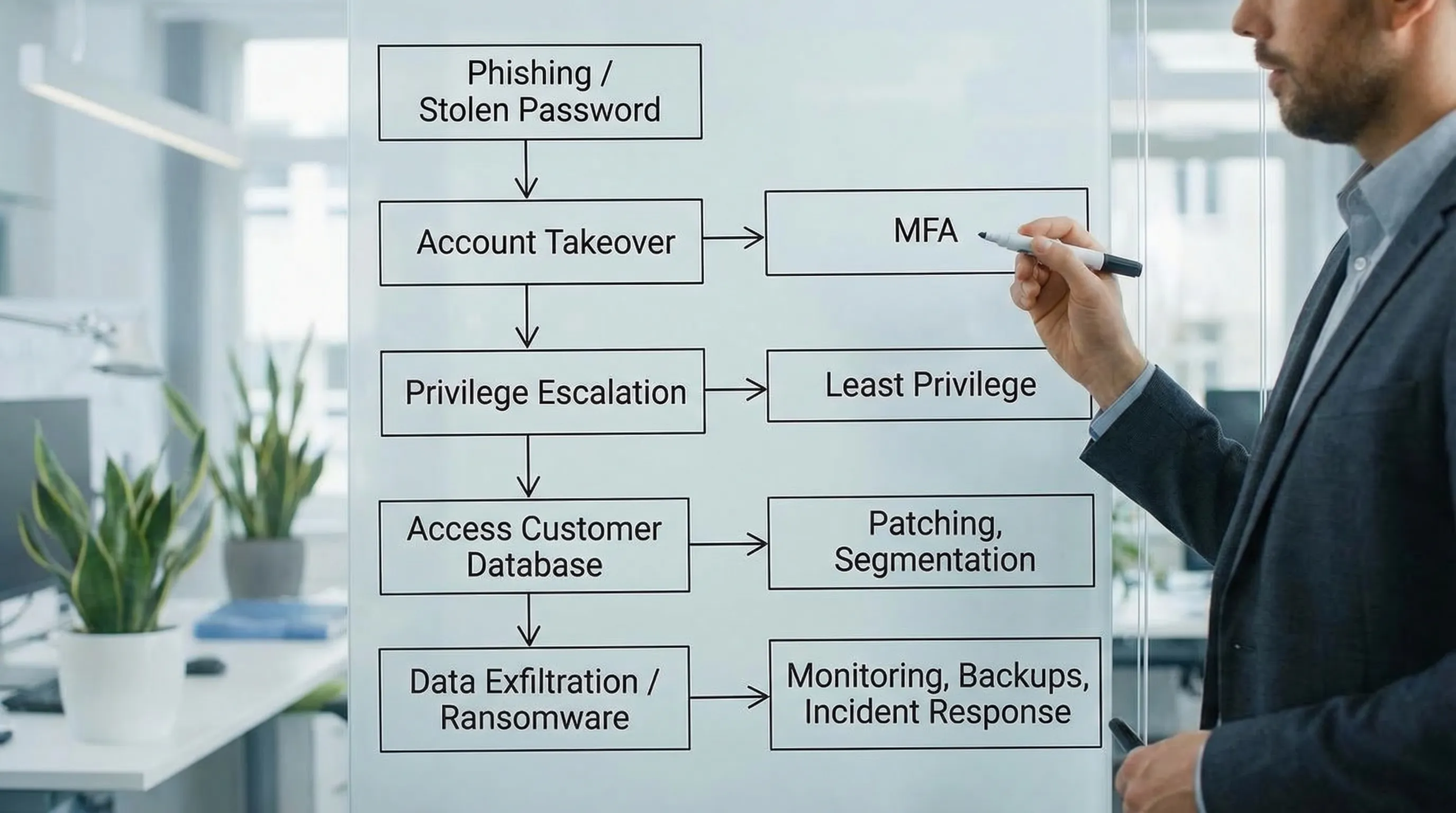
The controls that reduce risk fastest (and what “good” looks like)
Below are the controls that typically deliver the biggest risk reduction per dollar and per week of effort. They also create strong evidence for governance and compliance.
1) Multi-factor authentication (MFA) on all critical access
If one control must be prioritised, it is MFA. Credential theft is a common entry point. MFA reduces the likelihood that a stolen password becomes a breach.
Start with these MFA targets:
Email and collaboration tools (Microsoft 365, Google Workspace)
Remote access (VPN, remote desktop gateways)
Admin consoles (cloud dashboards, firewalls, finance systems)
Any system with customer, patient, student, or employee personal data
What “good” looks like: MFA is enforced, not optional. Admin accounts use stronger methods (for example, authenticator app or hardware keys), and “break glass” emergency accounts are controlled and monitored.
2) Asset inventory and data mapping (yes, it is a cyber control)
You cannot protect what you cannot find. Many incidents expand because teams do not know where personal data is stored, copied, exported, or backed up.
Treat your inventory as a security tool:
Maintain a list of devices, servers, cloud services, and key applications
Identify the systems that process personal data (your “crown jewels”)
Link owners to each system (business owner and technical owner)
This is where privacy and cyber meet. A data map is not only about legal obligations, it tells you where to apply encryption, logging, access controls, and retention.
3) Least privilege and role-based access control (RBAC)
Excessive access turns a small incident into a big one. If every staff member can export full customer lists, a single compromised account becomes catastrophic.
What “good” looks like:
Access is based on roles and job needs, not convenience
Privileged access (admin rights) is rare, time-bound, and reviewed
Sensitive actions (exports, deletions, bulk downloads) are restricted and logged
For many organisations, a quarterly access review for key systems is a realistic starting point. Over time, move toward automated joiner-mover-leaver processes.
4) Patch and vulnerability management for internet-facing systems
Attackers often do not “hack” in a dramatic way. They scan the internet for known vulnerabilities and misconfigurations.
Minimum standard to aim for:
Maintain patching SLAs based on severity (critical and internet-facing first)
Include network devices, appliances, and third-party software, not only laptops
Track exceptions and compensating controls when patches cannot be applied
A practical approach is to start with your external perimeter and identity stack first: email, VPN, firewall, remote access tools, cloud portals.
5) Backups designed for ransomware recovery (not just for deletion)
Backups reduce real risk only if they survive the incident and can be restored quickly. Ransomware operators often target backups first.
What “good” looks like:
Backups are protected from tampering (separate accounts, restricted access)
At least one backup copy is isolated from normal network access
Restore tests are performed and documented (not assumed)
Recovery objectives are defined for critical systems
IBM’s research consistently shows breaches are costly and disruptive, and recovery readiness is a key driver of business resilience. See the IBM Cost of a Data Breach Report for current global benchmarks and trends.
6) Secure configuration baselines (hardening) for endpoints and servers
Hardening closes “easy doors”: default settings, unnecessary services, weak local admin practices, and unmonitored scripting tools.
Focus on:
Disabling or restricting macros and risky scripting where not needed
Removing local admin rights from standard users
Standardising secure configurations for laptops, servers, and key applications
This is especially important for organisations with a mobile workforce or contractors.
7) Email and web controls that reduce phishing success
Phishing remains a reliable way to steal credentials and deliver malware. Training helps, but technical controls reduce the chance that one click becomes a breach.
High-value measures:
Strong spam and attachment filtering
Blocking known malicious domains and risky file types
Domain protections (SPF, DKIM, DMARC) to reduce impersonation
Pair this with short, role-based simulations and coaching, not only annual training. If you want a benchmark for common patterns, the Verizon Data Breach Investigations Report (DBIR) is a widely referenced source.
8) Centralised logging and alerting for your “crown jewels”
If you cannot detect suspicious behaviour, you cannot contain it. Logging is also a powerful compliance artefact because it demonstrates oversight and accountability.
Start small, log what matters most:
Admin logins and changes in key systems
Bulk exports, large downloads, and unusual access patterns
Authentication events (especially failed MFA, impossible travel, new devices)
What “good” looks like: logs are retained for a defined period, protected from alteration, and reviewed through alerts and periodic checks.
9) Incident response that is rehearsed (and aligned to privacy obligations)
Many organisations have an incident response plan, but fewer have exercised it. Tabletop exercises are where you find gaps in decision-making, communications, and evidence collection.
A practical incident readiness package includes:
Clear severity levels and escalation paths
A contact list (internal and external) that is kept current
A decision framework for containment actions (for example, disabling accounts)
A playbook for personal data incidents (what to preserve, who to notify, what to document)
This is where cyber data protection supports the governance expectation that organisations can respond responsibly when things go wrong.
10) Third-party and vendor access controls
Vendors often have direct pathways into your data through integrations, support logins, shared mailboxes, or unmanaged devices.
What “good” looks like:
Vendors are granted the minimum access they need, for limited periods
Remote support access is controlled, logged, and reviewed
Contracts and onboarding checklists include security expectations
High-risk vendors are assessed before go-live and periodically after
This is especially relevant for payroll providers, IT support, cloud platforms, payment services, and any outsourced customer operations.
A simple prioritisation table you can take to management
Not every control should be tackled at once. The table below helps leaders link controls to risk outcomes and evidence.
Control | Primary risk reduced | Quick “good enough” starting point | Evidence to keep (practical) |
MFA on critical systems | Account takeover | Enforce MFA on email, VPN, admin consoles | MFA policy, screenshots or settings export, exception register |
Least privilege / RBAC | Excessive access, data exfiltration | Restrict exports and admin rights, quarterly access reviews | Access review sign-offs, role matrix, privileged account list |
Patch management | Exploitation of known vulnerabilities | Patch critical and internet-facing systems first | Patch reports, vulnerability scans, exception approvals |
Ransomware-ready backups | Data loss and downtime | Isolated backup copy, quarterly restore tests | Restore test records, backup architecture notes |
Centralised logging | Late detection and weak investigation | Log admin actions and bulk exports in crown jewel systems | Log retention settings, alert rules, review notes |
Vendor access control | Third-party compromise | Time-bound vendor access, logging of sessions | Vendor register, access approvals, contractual clauses |
Incident response exercises | Slow containment, poor decisions | 1 tabletop exercise per year, plus 1 technical drill | Exercise report, action tracker, updated runbooks |
How to align cyber controls to the language leaders understand
Boards and senior management rarely want a list of tools. They want assurance that:
The organisation knows where its sensitive data is
Access is controlled and monitored
The most likely threats are mitigated
Incidents can be contained and recovered quickly
Using a recognised structure like NIST CSF can help you communicate maturity without drowning in technical detail.
NIST CSF 2.0 function | What leaders want to know | Example controls from this article |
Govern | Who owns risk and decisions? | Security ownership, vendor governance, incident roles |
Identify | What data and systems matter most? | Asset inventory, data mapping |
Protect | How do we prevent incidents? | MFA, least privilege, hardening, email security |
Detect | How do we know something is wrong? | Logging, alerting, monitoring |
Respond | Can we contain and communicate effectively? | Incident playbooks, tabletop exercises |
Recover | Can we restore services and data? | Ransomware-ready backups, restore testing |
The “evidence pack” that makes cyber data protection defensible
If you ever need to demonstrate due care (to customers, leadership, insurers, auditors, or a regulator), evidence matters. Build a lightweight evidence pack as you implement controls.
A strong starter pack usually includes:
System list and crown jewel data map
Access control policy and recent access review records
MFA enforcement proof and exception tracking
Patch and vulnerability reports with remediation tracking
Backup and restore test records
Incident response plan and at least one exercise report
Vendor register with risk tiering and access approvals
This is also the material that makes internal reporting easier, because you can show progress through artefacts, not opinions.
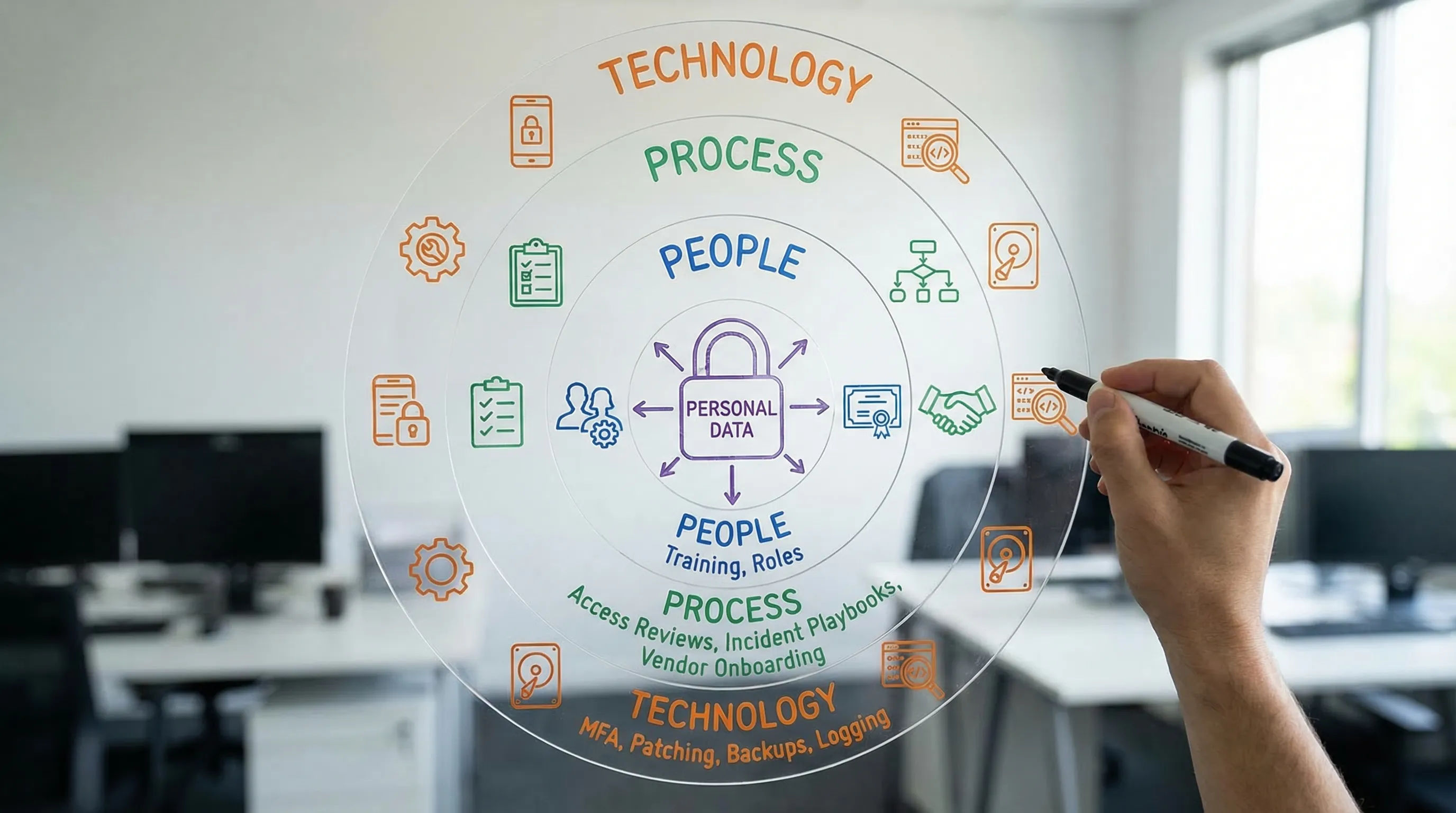
Where PLMC can help (without slowing you down)
If you are trying to reduce real risk while meeting Data Protection Act expectations, the hardest part is usually turning intentions into operational controls across IT, HR, operations, and vendors.
PLMC supports Jamaican organisations with practical governance, risk, and compliance work that connects privacy requirements to cyber controls, including implementation support, training, and risk assessment. If you want a focused conversation on what to prioritise first (based on your data, systems, and threat exposure), start with a consultation via Privacy & Legal Management Consultants Ltd..