

Patient Data Security and Privacy: A Guide for Clinics

Patient trust is a clinic’s most valuable asset. If appointment notes, lab results, or billing details leak, the harm is personal, immediate, and hard to undo. Add ransomware, phishing, and the everyday reality of front-desk workflows, and it becomes clear why patient data security and privacy cannot be treated as “an IT issue.” It is a clinical risk, a legal risk, and a reputation risk.
This guide is written for clinics in Jamaica that want a practical, clinic-friendly approach to protecting patient information while aligning with the Jamaica Data Protection Act, 2020 and good governance practices.
What counts as “patient data” (and where it actually lives in a clinic)
In healthcare settings, “patient data” is rarely confined to a single system. It spreads across clinical, administrative, and communication tools, including paper.
Common patient data categories include:
Identity and contact details: name, address, TRN, date of birth, next of kin.
Clinical information: symptoms, diagnoses, medications, allergies, immunisations, visit notes.
Test results and imaging: lab reports, radiology images, referrals.
Financial and insurance information: payment records, invoices, insurer data.
Highly sensitive details: sexual health information, mental health notes, HIV status, fertility care, substance use history.
Where clinics often find “hidden” patient data:
WhatsApp threads used for scheduling or sending photos
Staff email inboxes and sent folders
Printed encounter forms, fax scans, and “temporary” paper notes
Shared desktops at reception, unlocked screens in exam rooms
Vendor portals (labs, imaging centres, insurers)
Backups on external drives or consumer cloud storage
Here is a simple way to think about risk hotspots in a typical clinic.
Patient data location | Why it’s risky | Practical mitigation |
Reception desk computer | High volume access, shared use, walk-by exposure | Unique user accounts, auto screen lock, clean-desk rules |
Messaging apps (including WhatsApp) | Easy to mis-send, weak retention control, devices get lost | Approved channels, device passcodes, clear no-results-by-chat rule |
Misdirected attachments, spoofing and phishing | Verification steps, encryption where appropriate, phishing training | |
Paper files | Copying, loss, uncontrolled viewing | Locked storage, sign-out logs, shredding schedule |
Cloud EHR / practice system | Vendor risk, password reuse, remote access | MFA, access reviews, vendor due diligence |
Legal and ethical context in Jamaica (what clinics should plan for)
Jamaica’s Data Protection Act, 2020 applies to organisations processing personal data, including clinics. Health information is generally treated as sensitive in privacy frameworks and demands stronger safeguards.
For clinics, the obligations typically translate into operational questions such as:
Are we collecting only what we need for care and legitimate clinic operations?
Are patients clearly told what we collect, why, who we share with, and how long we keep it?
Can we securely handle access or correction requests?
Do we have appropriate security, governance, and vendor controls?
If a security incident happens, do we know what to do, who leads, and what we document?
If you want a broader foundation on rights and principles, PLMC’s overview of data privacy principles and rights in Jamaica is a useful companion. This article focuses on clinic-specific realities and controls.
The clinic threat model: what actually causes patient data incidents
Most clinic incidents are not “Hollywood hacking.” They are predictable breakdowns in process, access control, or verification.
Common clinic threats include:
Phishing and credential theft: fake “lab portal” logins, urgent invoice emails, compromised vendor accounts.
Ransomware: encrypted EHRs and file servers, then extortion threats to publish patient data.
Misdirected communications: emailing the wrong “Mr Brown,” sending results to a family member, attaching the wrong PDF.
Lost or stolen devices: staff phones containing patient messages, unencrypted laptops, USB drives.
Insider access issues: staff browsing records out of curiosity, former staff accounts still active.
Vendor-side incidents: billing, transcription, IT support, appointment reminder platforms.
A helpful mindset for clinic leadership is to treat privacy and security as patient safety-adjacent: reduce the likelihood of incidents, reduce the blast radius when something goes wrong, and recover fast.
A clinic-ready security baseline (governance + technical controls + evidence)
You do not need enterprise complexity to build strong protection. You do need clarity about ownership, consistent routines, and a few non-negotiable technical safeguards.
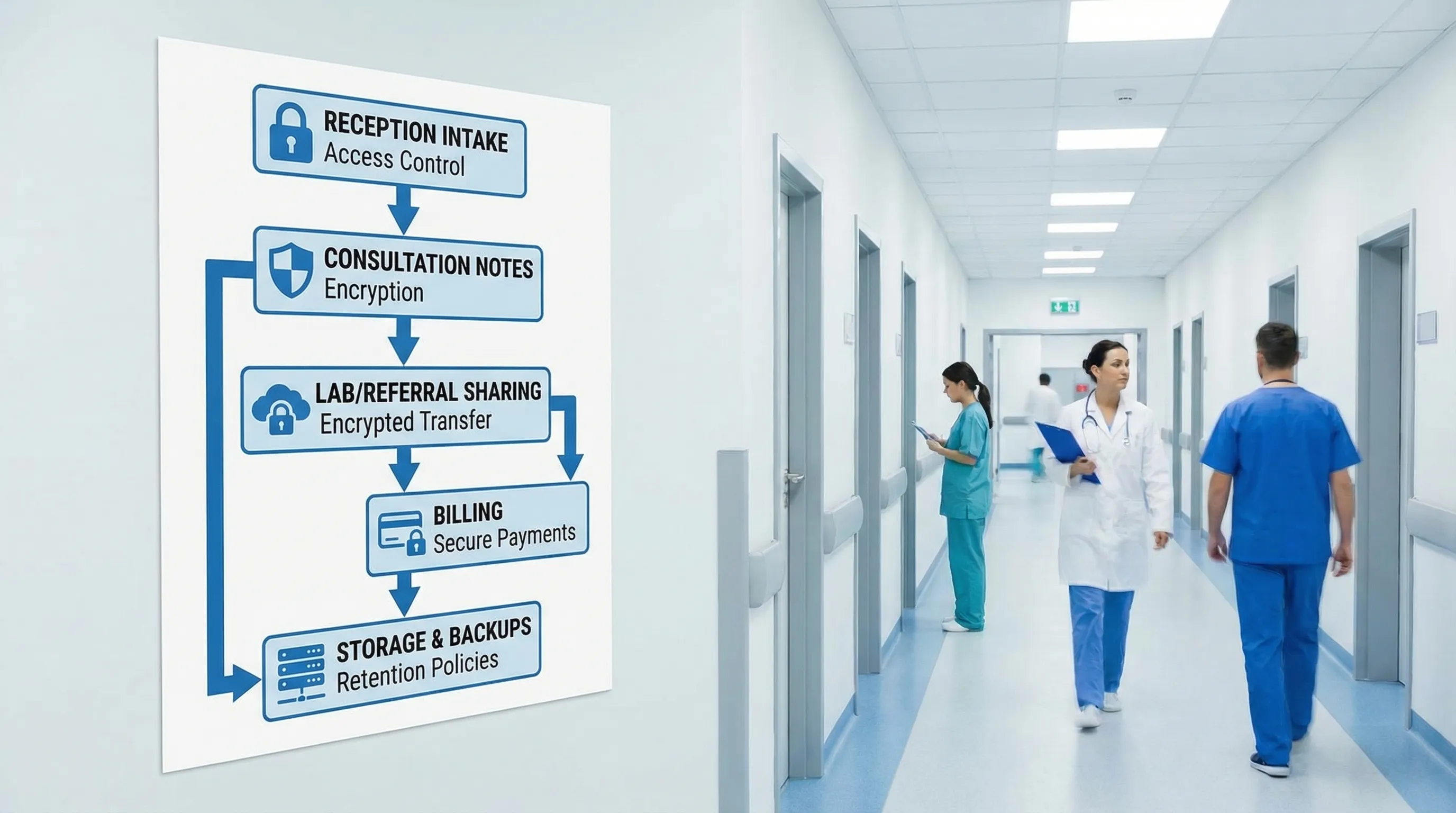
Governance: make security and privacy “owned,” not assumed
Start by assigning clear responsibility, even in a small clinic.
Name a privacy lead (or point person) accountable for coordinating compliance and handling patient queries.
Define who approves access to systems, who removes access when roles change, and who signs off vendor onboarding.
Maintain a short set of clinic policies that staff can follow in real situations (not long documents no one reads).
Evidence matters in compliance. Keep a simple “privacy and security evidence pack,” for example: policies, training records, access review logs, incident log, vendor list, and retention schedule.
The minimum technical safeguards most clinics should treat as non-negotiable
Below is a practical baseline that maps well to common security standards (and is consistent with recognised incident-handling guidance such as NIST SP 800-61 (Computer Security Incident Handling Guide)).
Control | What it prevents | What “good” looks like in a clinic |
Multi-factor authentication (MFA) | Stolen passwords becoming breaches | MFA on email, EHR, admin portals, remote access |
Unique user accounts (no shared logins) | No accountability, uncontrolled access | Every staff member has their own login, even at reception |
Least privilege access | Overexposure of sensitive records | Staff see only what they need for their role |
Automatic screen lock | Walk-by viewing, reception exposures | 2 to 5 minute lock time, especially in public areas |
Secure backups + restore testing | Ransomware and accidental deletion | Backups are protected and restore is tested on a schedule |
Patch and update routine | Exploits of known vulnerabilities | Operating systems and key apps are updated regularly |
Endpoint protection | Malware and ransomware spread | Managed antivirus/EDR on clinic devices |
Logging and basic monitoring | Incidents going undetected | Key systems retain logs and someone reviews alerts |
Encryption for portable devices | Lost laptop or USB exposure | Disk encryption enabled, removable media controlled |
If your clinic needs a broader starter structure, PLMC’s privacy and data protection practical checklist can help you validate that the basics are covered.
Privacy-by-design in daily clinic workflows (where most mistakes happen)
The biggest privacy wins often come from small workflow changes.
Reception and waiting areas
Reception is where privacy meets foot traffic.
Good practices include:
Keep screens angled away from patient view and use privacy filters if needed.
Confirm identity discreetly. Avoid reading sensitive reasons for visit aloud.
Use minimal information when calling patients (name only, not condition or test type).
Store printed schedules, referrals, and payment records out of casual view.
Results and follow-up communications
Clinics often underestimate how easily results can be misdirected.
Consider setting clinic-wide rules such as:
Results are not sent through informal channels unless explicitly approved and properly controlled.
Identity is verified before sending any attachment or discussing sensitive details by phone.
Staff use approved templates for emails and messages to reduce errors.
WhatsApp, personal phones, and “quick” photos
Many clinics rely on convenient messaging tools. The risk is not the app alone, it is the lack of governance: device loss, uncontrolled sharing, unclear retention, and blurred personal and professional use.
If a clinic must use messaging for operations, define boundaries:
What is allowed (for example, appointment reminders) and what is prohibited (for example, lab results).
Which devices are allowed (clinic-managed vs personal).
How messages are retained (or not retained) as part of the medical record.
What happens when a staff member leaves.
Paper records and disposal
Paper is still common in healthcare, and it is easy to overlook.
Lock storage rooms and cabinets.
Track file movement if records leave storage.
Use shredding bins and a documented destruction routine.
Avoid leaving “temporary” notes in exam rooms or nurses’ stations.
Vendor and cloud risk: the clinic is still accountable
Clinics frequently depend on third parties: EHR providers, labs, billing services, IT support, appointment reminders, payment processors, transcription, and cloud hosting.
Vendor governance does not need to be heavy, but it must be consistent.
A clinic-friendly vendor onboarding checklist typically includes:
Clear description of what data the vendor will access and why
Security requirements (MFA, encryption, access controls)
Breach/incident notification expectations and escalation contacts
Rules for subcontractors and data sharing
Data retention and secure deletion at contract end
Cross-border considerations if data is stored or accessed outside Jamaica
Documenting these basics reduces the chance that patient data “drifts” into systems the clinic cannot control.
Incident readiness: prepare like it will happen, not like it might
Many clinics first think about breach response after an incident. That is the most expensive time to build a plan.
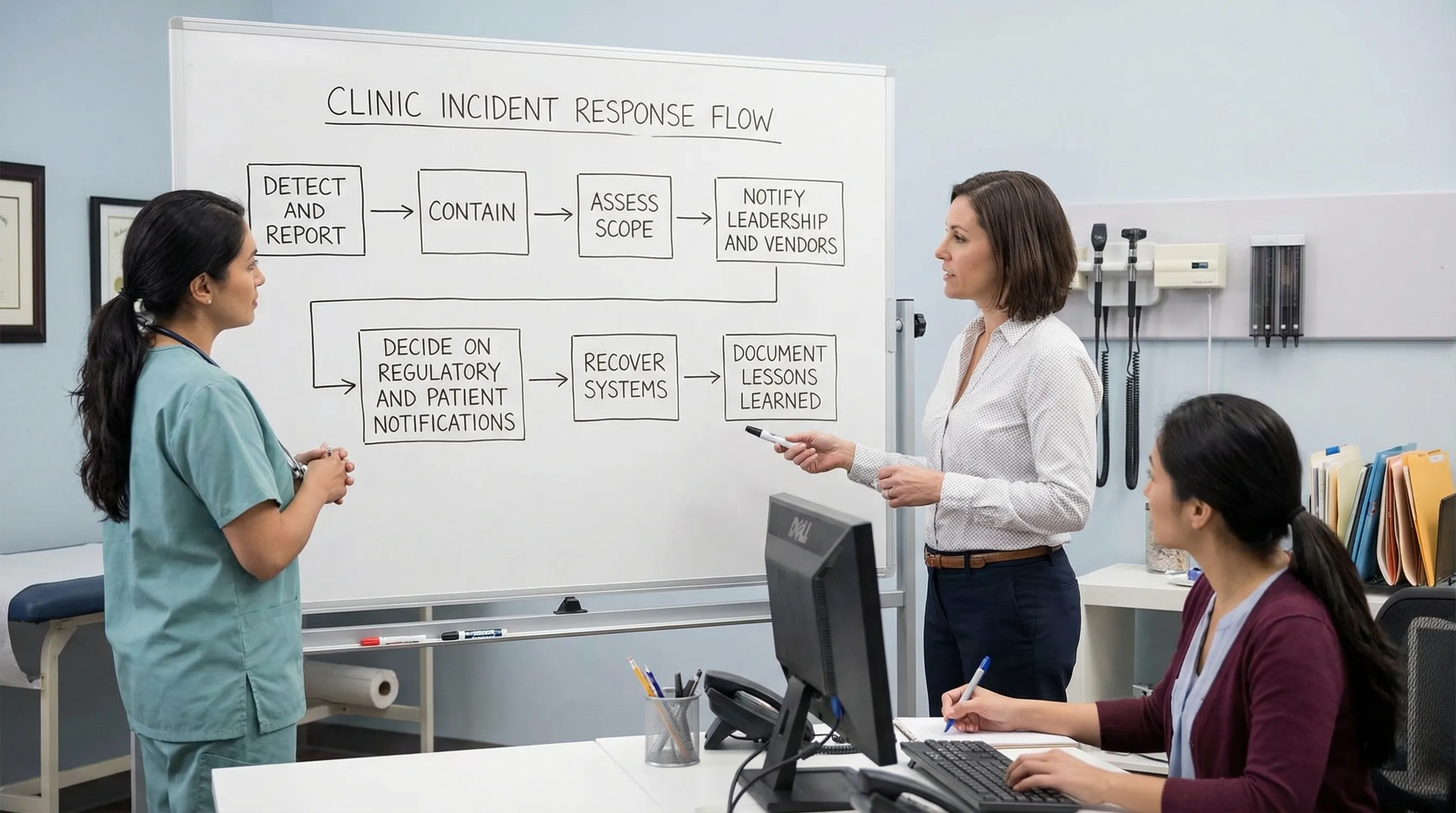
A practical clinic incident plan should answer:
Who staff report to (a single channel, not “tell someone”)
Who can disconnect a device or disable an account immediately
Who contacts vendors and the clinic’s legal/compliance support
How decisions are recorded (incident log)
How the clinic communicates internally so rumours do not become “facts”
Even if you outsource IT, the clinic should run periodic tabletop exercises, for example “ransomware on the appointment system” or “lab results emailed to the wrong address.”
Training that reduces mistakes (not just ticks a box)
In clinics, most privacy failures are human-process failures: rushed verification, weak passwords, clicking a link, using personal devices, or trying to be helpful quickly.
Effective clinic training is:
Short and role-based (front desk, nurses, doctors, billing)
Repeated in small doses (microlearning beats annual lectures)
Tested with realistic scenarios (mislabeled PDF, phone impersonation, vendor email)
If you want a structured way to build staff capability beyond basic awareness, consider reputable external training options that include practical modules and recognised certificates, such as UpSkilling’s live and microlearning courses for technology and digital skills.
Measuring progress: how clinics can prove improvement over time
Security and privacy maturity is easier to manage when you track a few indicators and review them consistently.
Useful clinic-level metrics include:
Metric | Why it matters | Example target |
Access review completion | Detects “access creep” and orphaned accounts | Quarterly review documented |
MFA coverage | Reduces account takeover risk | 100% on email and EHR |
Patch/update compliance | Reduces vulnerability exposure | Updates applied within defined timeframes |
Backup restore test success | Ensures recoverability after incidents | Successful test on a schedule |
Incident and near-miss logging | Builds learning culture and evidence | All events logged, trends reviewed |
Training completion by role | Reduces repeated workflow errors | New hires trained before system access |
The goal is not perfect metrics, it is a steady, documented reduction in risk.
Putting it into action: a realistic 30-day start for busy clinics
If your clinic needs momentum, focus on the highest-impact actions first:
Turn on MFA for email and clinical systems.
Remove shared logins and review who has access.
Set screen lock timers on all clinic devices.
Confirm backups exist, are protected, and can be restored.
Establish a clear rule for messaging, results, and identity verification.
Create a one-page incident reporting and escalation guide.
From there, build out vendor controls, retention schedules, and evidence packs.
When to bring in support
Clinics often need help translating legal obligations into day-to-day controls, selecting proportionate safeguards, and building documentation that stands up to scrutiny. PLMC supports Jamaican organisations with privacy, cyber security, and compliance implementation, including training, risk assessment tools, and free consultations.
If you want to reduce risk quickly, the best next step is usually a focused clinic risk assessment that maps your data flows, identifies your top exposure points, and prioritises controls you can implement without disrupting patient care.