

How to Review AI Tools Before Staff Start Using Them
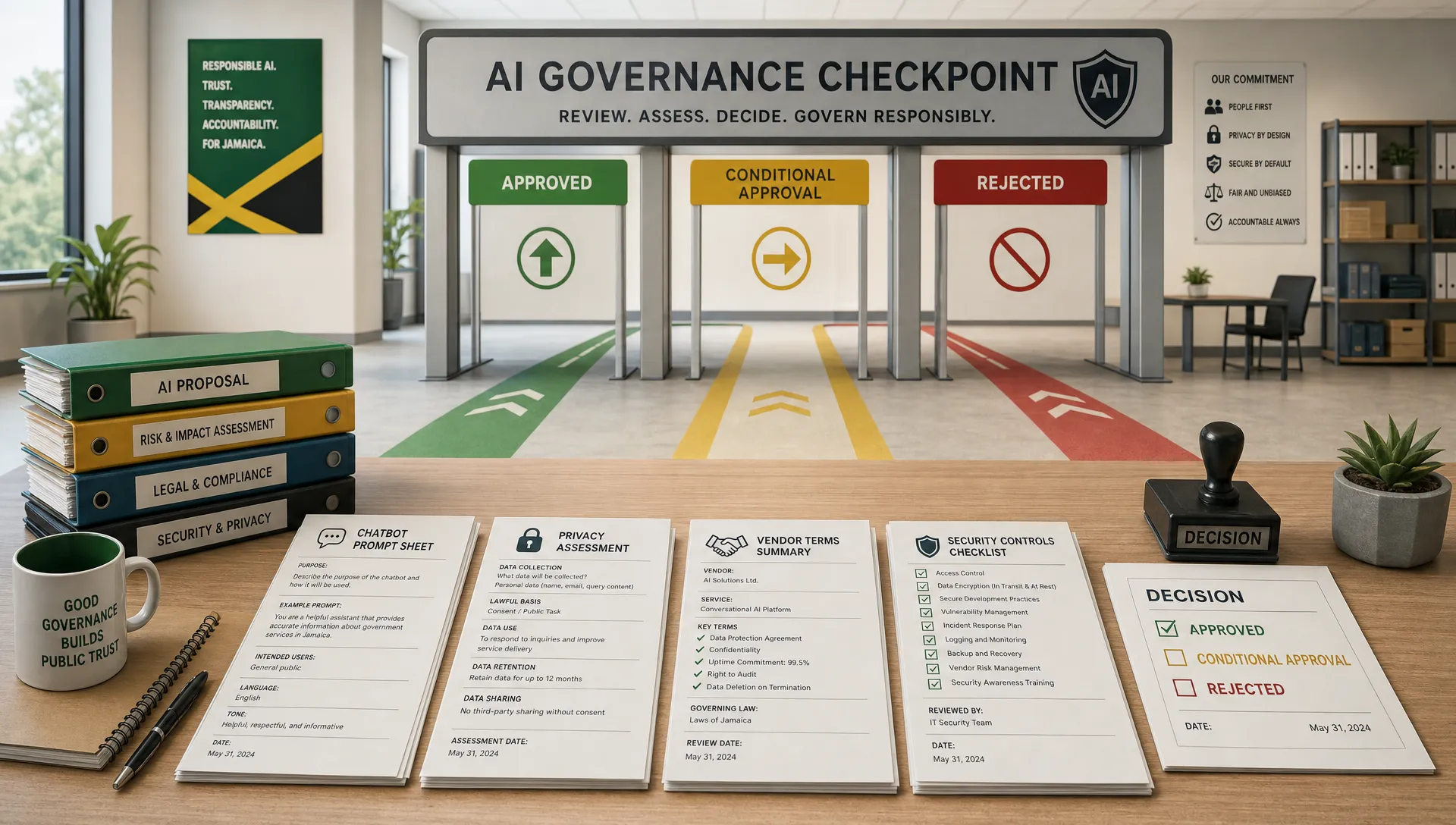
AI tools are no longer a future issue for compliance teams. Staff are already testing chatbots, meeting transcription apps, writing assistants, spreadsheet analysers, customer service bots and coding copilots. The risk is not that employees want to work faster. The risk is that they may upload personal data, confidential files or regulated information into tools the organisation has never reviewed.
A good review process should not be designed to block innovation. It should help the organisation decide which AI tools are safe to use, which need controls, and which should be rejected before they create data protection, cybersecurity or governance problems.
For Jamaican organisations, that review should sit inside wider data protection compliance, corporate governance and risk management. If an AI tool touches personal data, customer records, employee information, financial data or anti-money laundering processes, it deserves structured scrutiny before staff start using it.
Why a pre-use AI review matters
Unapproved AI use often starts innocently. A staff member wants help summarising a report. A manager wants to draft a policy. A customer service team wants faster responses. A finance or compliance team wants to analyse a large spreadsheet.
The challenge is that many AI tools process information outside the organisation's direct environment. Some store prompts. Some use uploaded content to improve models unless settings or contract terms say otherwise. Some rely on sub-processors in other countries. Some generate inaccurate outputs that look credible. Others connect to email, documents, calendars or customer platforms and can access more information than the user realises.
Under Jamaica's Data Protection Act, 2020, organisations remain accountable for how personal data is collected, used, protected, retained and transferred. The Office of the Information Commissioner provides local guidance and oversight, but accountability starts inside the organisation. AI does not remove that responsibility.
A review process helps you answer practical questions before damage is done: what data will staff enter, where will it go, who can access it, how long will it be kept, what will the output be used for, and what happens if the output is wrong?
Start with the use case, not the brand name
A common mistake is asking whether a particular AI tool is safe in general. That question is too broad. The same tool may be low risk for drafting a generic meeting agenda and high risk for analysing employee medical information or customer complaints.
Start by documenting the specific use case. Ask what task the tool will perform, which teams will use it, what data they will enter, what outputs will be produced, and whether those outputs will influence decisions about individuals.
AI use case | Typical risk level | Main review focus |
Drafting generic internal text with no confidential data | Lower | Accuracy checks, staff guidance and acceptable use rules |
Summarising internal meetings | Medium | Consent or notice, recording controls, retention and access permissions |
Analysing customer complaints | Medium to high | Personal data handling, fairness, retention, security and escalation rules |
Screening candidates or assessing staff performance | High | Bias, transparency, human review, legal basis and records of decisions |
Supporting AML or KYC investigations | High | Accuracy, explainability, audit trail, false positives and regulatory accountability |
Customer-facing chatbot | High if personal data may be shared | Privacy notices, data minimisation, logging, response quality and escalation |
The safest approach is to approve a use case, not just a product name. Staff should know that approval for one activity does not automatically mean they can use the same tool for another purpose.
Identify what data staff may enter
Before reviewing features or price, decide what data the tool is allowed to process. This is where many AI risks become visible.
As a default rule, staff should not paste personal data, customer records, employee files, financial account information, passwords, legal advice, contracts, incident reports, proprietary code or confidential strategy documents into any AI tool until it has been reviewed and approved for that type of information.
Data type | Examples | Default decision before review |
Public information | Published website copy, public press releases, general market information | May be acceptable with output checking |
Internal but non-confidential information | Generic templates, non-sensitive process notes | May be acceptable with staff rules |
Confidential business information | Contracts, board papers, pricing, strategy, internal investigations | Requires contractual, security and access controls |
Personal data | Customer names, contact details, employee records, complaint histories | Requires data protection review |
Sensitive or high-risk personal data | Health information, biometric data, disciplinary records, financial hardship details | Usually requires enhanced review and senior approval |
Credentials and security information | Passwords, API keys, access tokens, vulnerability details | Should not be entered into general AI tools |
This classification should be simple enough for staff to apply. If employees cannot tell what is allowed, they will guess. In privacy governance, guessing is not a control.
Map the tool against the Data Protection Act, 2020
If the AI tool will process personal data, the review should map the use case against the core data protection standards in Jamaica's Data Protection Act, 2020. The organisation should be able to explain why the processing is fair and lawful, why the data is necessary, how long it will be kept, how it will be secured, and whether it may be transferred outside Jamaica.
Key questions include:
What is the specific purpose for using the AI tool?
What personal data will be processed, and is all of it necessary?
What lawful basis or condition supports the processing?
Have staff, customers or other data subjects been told what will happen to their data?
Can inaccurate data or AI-generated errors be corrected?
How long will prompts, files, transcripts and outputs be retained?
Can the organisation respond to data subject rights requests?
Will data be transferred to another country, and what safeguards apply?
What technical and organisational security measures are in place?
For higher-risk uses, a short privacy impact assessment or DPIA-style review is often the most practical way to document the decision. If your team needs a simple structure, this guide on how to run a data privacy assessment without overcomplicating the process is a useful starting point.
Some Jamaican organisations may also need to consider GDPR or UK GDPR obligations, especially if they offer goods or services to people in those jurisdictions or process their personal data. That does not replace the local review. It adds another layer of compliance to check.
Review the vendor before procurement
An impressive demo is not evidence of compliance. Before staff use the tool, the organisation should review the vendor's privacy, security and contract terms. This is especially important where the vendor will host data, process prompts, store outputs or connect to internal systems.
Vendor question | What to look for |
Will our prompts, files or outputs be used to train the model? | Clear opt-out, enterprise protections, or contractual wording that prevents training on your data |
Where will data be stored or transferred? | Hosting locations, sub-processor lists, cross-border transfer safeguards and notification of changes |
How long is data retained? | Configurable retention, deletion rights, transcript controls and account closure procedures |
What security controls are available? | MFA, encryption, access controls, admin settings, audit logs and incident notification |
What contract terms apply? | Data processing terms, confidentiality, liability, audit rights, service levels and breach reporting |
Can the organisation manage users centrally? | Single sign-on, role-based access, account removal and administrator visibility |
Does the vendor explain limitations? | Clear documentation on accuracy, bias, prohibited uses and human oversight requirements |
Do not assume that a paid subscription automatically provides enterprise-grade privacy protections. Consumer accounts, browser extensions and free tools may have very different terms from business or enterprise versions.
Check cybersecurity and access controls
AI tools create cybersecurity risk when they connect to other systems or expand access to information. A meeting assistant may access calendars. A writing tool may read documents. A chatbot builder may connect to a customer database. A browser extension may be able to read the content of every page a user visits.
Your IT or cybersecurity team should check whether the tool supports multi-factor authentication, single sign-on, least privilege access, user offboarding, logging, encryption and administrator controls. They should also review integrations, plug-ins, API keys and data export options.
This is where privacy and cybersecurity need to work together. A tool can have a strong privacy notice but weak access controls. It can also have good security settings that are useless if no one configures them. The review should assign ownership for setup, monitoring and user management before launch.
Test output risk, not just input risk
AI risk is not only about what staff upload. It is also about what the tool produces and how people use it.
Generative AI can produce fluent but incorrect content. It may invent sources, misread documents, summarise a complaint unfairly, or give a confident answer to a legal or regulatory question that needs professional judgement. Predictive AI can also create bias if it is trained on incomplete, outdated or unrepresentative data.
The NIST AI Risk Management Framework is helpful because it encourages organisations to govern, map, measure and manage AI risks throughout the system lifecycle. In practical terms, that means you should test the tool with realistic examples before approving it.
Human review should be mandatory where AI output may affect customers, employees, applicants, borrowers, patients, insured persons or other individuals. It is especially important for legal, compliance, HR, credit, insurance, AML, KYC, disciplinary and safety-related uses.

Decide the approval category
Not every tool needs the same decision. A risk-based process can be simple and still effective. Instead of treating every request as approved or rejected, use approval categories that match the risk.
Approval category | When to use it | Example conditions |
Approved for low-risk use | The tool will not process personal or confidential data | Staff must verify outputs and follow acceptable use rules |
Approved with conditions | Risks can be managed with controls | Use business accounts only, restrict data types, enable logging and set retention limits |
Pilot only | The value is promising but risk needs testing | Limit users, limit data, monitor errors and review after a fixed period |
Not approved | Risks are unclear, excessive or unsupported by the vendor | Do not upload business data or use for organisational work |
Each decision should identify a business owner, approved users, permitted data types, prohibited uses, review date and escalation contact. Without these basics, staff may misunderstand the approval and expand use beyond the original purpose.
Put staff rules in writing before launch
Once a tool is approved, the next risk is inconsistent use. Staff need plain rules, not a long policy they will never read.
At minimum, your AI use rules should explain which tools are approved, which data must never be entered, when human review is required, whether AI-assisted content must be disclosed, how outputs should be stored, and what to do if someone accidentally uploads the wrong information.
Training matters here. Staff are more likely to follow rules when they understand real examples from their work. If your AI rollout depends on new behaviours, connect it to data protection training that staff will apply, rather than relying on a policy email alone.
Build a light review workflow
The best AI review process is the one people will actually use. If the process is too slow or unclear, staff may bypass it. If it is too loose, it will not protect the organisation.
A practical workflow can include these stages:
Staff submit the AI tool name, business purpose, users, data types and expected outputs.
Privacy or compliance reviews personal data, lawful basis, notices, retention and transfer issues.
IT or cybersecurity reviews access controls, integrations, authentication, logging and incident response.
Procurement or legal reviews vendor terms, data processing clauses, confidentiality and liability.
The business owner tests outputs, confirms human review controls and accepts operational responsibility.
The final decision is recorded in an AI register with conditions, owner and review date.
This does not need to start as a complex system. A controlled form, a spreadsheet register and clear approval rules can work well at the beginning. The key is consistency and evidence. If a regulator, auditor, board member or customer asks why a tool was approved, the organisation should be able to show the basis for the decision.
Watch for red flags
Some AI tools should be paused until more information is available. Red flags include vendors that will not explain how data is used, tools that cannot delete uploaded content, products that require personal accounts for business use, unclear sub-processor arrangements, broad browser permissions, no meaningful security documentation, or terms that allow business data to be used for model training without control.
High-risk use cases also deserve caution. If the tool will influence hiring, promotion, lending, insurance, disciplinary action, AML alerts, customer eligibility or access to services, do not rely on general approval. Require a deeper review, documented testing and human oversight.
Another red flag is uncontrolled enthusiasm. If a department wants to upload a large historical dataset before anyone has defined the purpose, data fields, retention period or accuracy checks, the organisation should slow down. AI can multiply the impact of poor data governance.
Review approved tools regularly
AI review is not a one-time exercise. Vendors change terms. New features appear. Staff find new use cases. A tool that was low risk at launch may become high risk if it is later connected to customer data, HR records or financial systems.
Set review triggers. Reassess an approved AI tool when the vendor changes material terms, adds new integrations, changes data retention settings, introduces new model training practices, suffers a security incident, expands to new departments, or begins processing new categories of data.
A routine review cycle also helps management see the bigger picture. Which tools are approved? Which business units are using them? Which risks keep recurring? Which controls are working? These answers support better corporate governance and more confident adoption.
Frequently Asked Questions
Can staff use free AI tools if they do not enter personal data? Possibly, but only if the organisation has set clear rules. Free tools may still create confidentiality, accuracy, intellectual property and cybersecurity risks. Staff should not use personal accounts for business information unless that use has been approved.
Is an AI tool review the same as a data protection impact assessment? Not always. An AI review is broader because it can cover cybersecurity, vendor terms, operational risk, output accuracy and staff controls. If the tool processes personal data or creates high risk for individuals, a privacy impact assessment or DPIA-style review may be part of the AI approval process.
Who should approve AI tools before staff use them? Approval should usually involve the business owner, privacy or compliance, IT or cybersecurity, and legal or procurement where vendor terms are involved. Senior leadership should be involved for high-risk uses such as HR decisions, customer eligibility, AML monitoring or large-scale personal data analysis.
Do customers or staff need to be told when AI is used? Often, transparency is important, especially where personal data is processed or AI affects how services, complaints, employment matters or decisions are handled. Review privacy notices, employee communications, contracts and customer-facing disclosures before launch.
What should we do if staff are already using AI tools without approval? Start with an inventory, not blame. Identify which tools are being used, what data has been entered, whether any sensitive or confidential information was uploaded, and which uses should be paused. Then prioritise high-risk tools for review and give staff clear interim rules.
Bring AI into governance before it becomes a problem
AI can improve productivity, customer service and analysis, but only if organisations manage the risks before staff build habits around unapproved tools. A practical review process gives teams room to innovate while protecting personal data, confidential information and regulatory accountability.
If your organisation needs help reviewing AI tools, strengthening data protection compliance or training staff on responsible use, speak with Privacy & Legal Management Consultants Ltd.. A structured approach now can prevent expensive governance problems later.