

Data Protection Awareness Training Ideas That Actually Stick

Awareness training is easy to schedule, but hard to make useful. Many employees complete an annual slide deck, pass a short quiz, and then return to the same habits that create privacy risk: sending files too quickly, collecting too much information, storing records for too long, or failing to report a suspected incident.
Effective data protection awareness training works differently. It helps people recognise personal data in their actual work, practise the right response, and remember what to do when pressure is high. For Jamaican organisations operating under the Data Protection Act, 2020, this matters because compliance is not only about having policies. It is about proving that staff understand and apply them.
Below are practical training ideas designed to stick, especially for teams handling customer, employee, patient, student, member, or client information.
What makes data protection awareness training stick?
Training sticks when it changes behaviour, not just knowledge. A useful session should help staff do the following in everyday situations:
Recognise personal data and sensitive personal data in emails, forms, spreadsheets, apps, paper files, CCTV, and customer conversations.
Pause before collecting, sharing, or reusing personal data for a new purpose.
Verify identity and authority before disclosing information.
Use approved systems and secure sharing methods.
Escalate rights requests, complaints, and incidents quickly.
Follow retention and disposal rules instead of keeping everything just in case.
The goal is not for every employee to become a privacy lawyer. The goal is for each person to make better decisions at the point where data is collected, viewed, changed, shared, stored, or deleted.
One useful lesson comes from behaviour change outside compliance. Programmes that combine expert advice with coaching and regular progress checks, such as medically supervised weight loss with personal coaching, focus on habits, feedback, and accountability rather than information alone. Data protection training should do the same: teach a small behaviour, let people practise it, then reinforce it until it becomes normal.
Training principle | How to apply it | Why it helps |
Teach one behaviour at a time | Focus a short session on secure sharing, rights requests, incident reporting, or data minimisation | Staff remember a clear action better than a broad lecture |
Use real workplace scenarios | Adapt examples from HR, customer service, sales, IT, finance, clinics, schools, or field teams | Employees see why the rule matters to their role |
Make people practise | Use role-play, email checks, form reviews, and incident drills | Practice exposes misunderstandings before real incidents occur |
Reinforce often | Add monthly reminders, manager huddles, and short quizzes | Spaced repetition improves recall |
Keep evidence | Record attendance, scenarios used, quiz outcomes, and corrective actions | Evidence supports accountability and audit readiness |
For a wider curriculum structure, PLMC’s guide on privacy and data protection training by role can help you decide what each team should learn.
10 data protection awareness training ideas your staff can apply
1. Personal data spotting warm-up
Start with a simple exercise: show staff examples of everyday business records and ask whether each one contains personal data. Use mock documents, never real customer or employee records. Examples can include a CV, visitor log, payroll extract, complaint email, CCTV still, delivery record, clinic appointment note, WhatsApp message, loyalty programme form, or spreadsheet of customer IDs.
Ask three questions for each example: Does this identify a person? Is any of it sensitive? Who should be allowed to access it? This quickly moves data protection from abstract law to everyday recognition.
This is especially useful for new employees, front desk staff, sales teams, HR, and managers who approve new forms or systems.
2. Before-you-send email lab
Wrong-recipient emails are one of the most common privacy failures because they happen during routine work. Build a short training lab using fake emails with planted mistakes. Staff must identify the risk before they can send the message.
Examples include an attachment with extra tabs, a customer list sent to the wrong department, a CC field exposing multiple recipients, an unredacted ID document, or a file link open to anyone with the link. Then teach a 30-second check: recipient, attachment, purpose, permissions, and channel.
This works well because staff practise the exact behaviour they need before sending real data.
3. Data minimisation form teardown
Bring a current form into training, such as an onboarding form, membership form, customer intake form, vendor registration form, event sign-up form, or website contact form. Ask the team to review each field and decide whether it is truly needed.
For every field, ask: What is the purpose? Is it required or optional? Who uses it? How long do we keep it? What happens if it is inaccurate or exposed?
This exercise often reveals overcollection. For example, a form may request date of birth when age range is enough, or require a national ID number when another verification method would be less intrusive. Removing unnecessary fields reduces privacy risk before it enters the organisation.
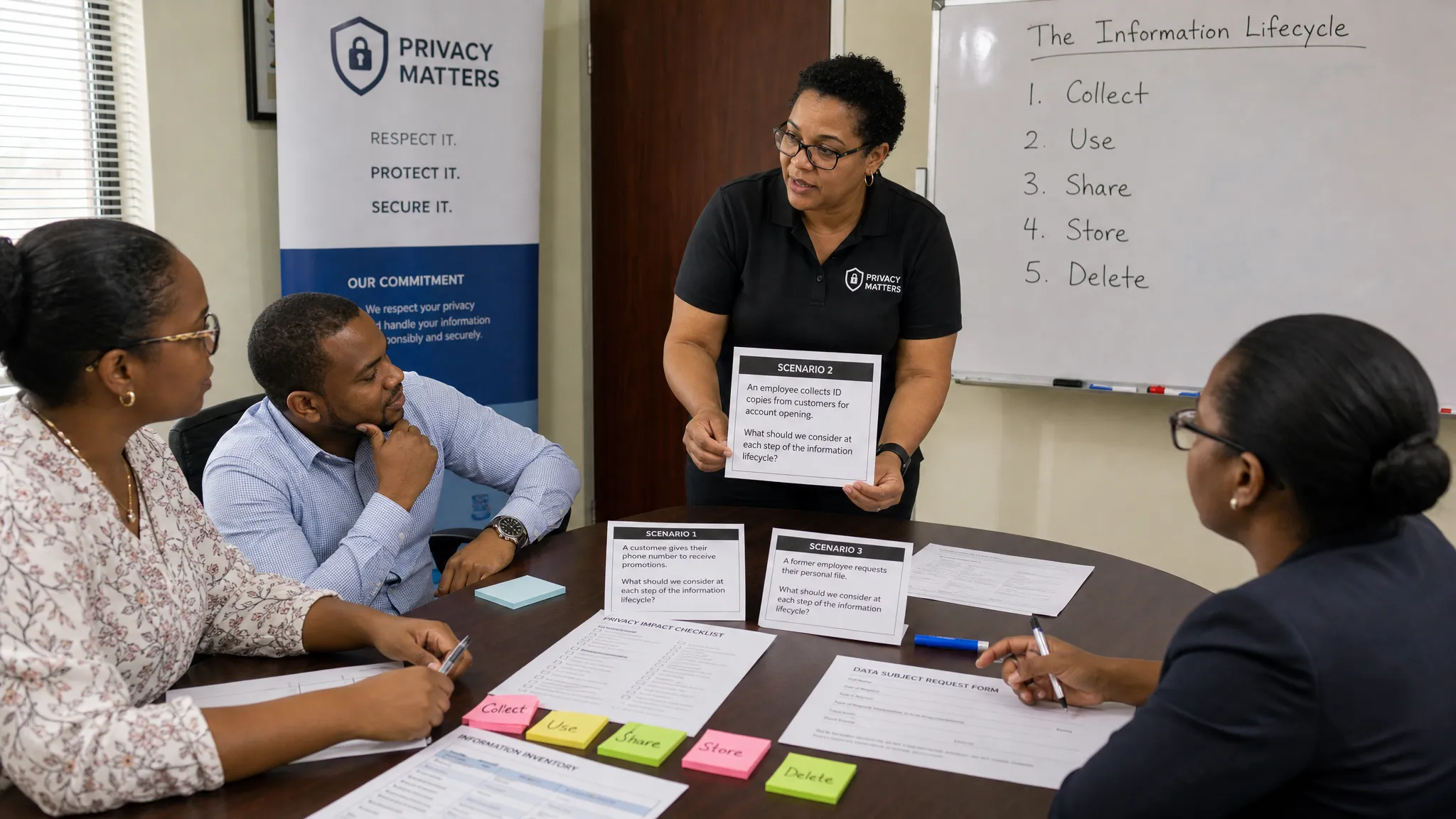
4. Identity verification role-play
Many privacy incidents happen because someone discloses information to the wrong person. Role-play makes this risk memorable.
Create short scripts where a caller, visitor, relative, colleague, vendor, or former employee requests personal data. The staff member must decide what to say, how to verify identity, whether the requester has authority, and when to escalate.
Good scenarios include a spouse asking for employee salary information, a parent asking for a student record, a customer asking for account details over the phone, a vendor requesting a staff list, or a manager asking HR for medical information without a clear need.
The key lesson is simple: be helpful, but do not disclose personal data until identity, authority, purpose, and minimum necessary information have been checked.
5. Rights request relay
Employees do not always recognise a data subject request when it arrives. A customer may ask to see what information you hold about them. An employee may ask for a correction. A former client may object to marketing. A member may ask why their information was shared.
In a rights request relay, the trainer gives a request card to one participant. The team must decide whether it is a rights request, what information to capture, who owns the response, and how quickly it should be escalated under the organisation’s internal procedure.
This exercise is useful because rights requests can arrive through unexpected channels, including reception, email, phone calls, social media, sales teams, or branch offices. Staff do not need to answer every request themselves, but they must know how to recognise and route it.
6. First 30 minutes incident drill
Incident response training should not be reserved for IT. A privacy incident can start with a misplaced file, a stolen bag, a misdirected email, a suspicious login, a phishing message, or a printed report left in a public area.
Run a short drill where teams practise what to do in the first 30 minutes. The focus should be on reporting quickly, preserving evidence, containing further exposure, and avoiding quiet fixes that hide the problem.
Scenario | What staff should learn | Evidence to keep |
Email sent to the wrong recipient | Report immediately, do not delete records, seek containment support | Incident drill record and corrective actions |
Lost paper file | Identify what was in the file, when it was last seen, and who may be affected | Attendance log and scenario notes |
Phishing message with customer data risk | Stop interaction, report to IT or security, and preserve the email | Phishing drill results |
Unauthorised colleague access | Escalate suspected snooping or access misuse without confrontation | Case discussion record |
A rise in incident reporting after training is not always bad. It may mean staff are finally recognising and escalating issues that were previously hidden.
7. Vendor and cloud handoff map
Many employees do not realise how often personal data leaves the organisation. Training should help them see the handoffs.
Ask each team to map where personal data goes after they collect it. Does it move to a payroll provider, cloud storage platform, courier, CRM, marketing tool, payment processor, accountant, call centre, parent company, overseas vendor, or external consultant?
Then discuss the control points: approved vendor, written agreement, purpose, access limits, security expectations, transfer considerations, and retention. This is a practical way to connect staff behaviour with vendor governance.
8. Retention clean-up sprint
Retention is hard to teach through theory. It becomes clearer when teams look at actual folders, shared drives, filing cabinets, inboxes, and system exports.
In a clean-up sprint, each department chooses one low-risk area to review against the organisation’s retention rules. The goal is not random deletion. The goal is controlled action: identify duplicates, archive records properly, delete what is approved for deletion, and document what was done.
This teaches staff that keeping data forever is not safer. Over-retention increases exposure, makes rights requests harder, and weakens compliance evidence.
9. Privacy-by-design mini clinic
Use this idea whenever a team plans a new process, campaign, software tool, form, event, camera installation, customer portal, or reporting dashboard.
The trainer gives the team a short privacy checklist and asks them to assess the proposal before launch. Questions should cover purpose, data categories, lawful basis, notice, access, security, vendor involvement, retention, individual rights, and risks to affected people.
This is especially valuable for managers because it teaches them to involve privacy, legal, compliance, and IT early rather than after a system is already live.
10. Department teach-back sessions
People remember material better when they have to explain it to someone else. Ask each department to prepare a five-minute teach-back on one privacy risk in its own work.
HR may explain secure employee file handling. Customer service may explain identity checks. Marketing may explain consent and suppression lists. Finance may explain secure invoice sharing. IT may explain access control. Security or reception may explain visitor logs and CCTV handling.
Keep the format simple: one risk, one wrong way, one right way, and one escalation point. Teach-back sessions also reveal where policies are unclear or difficult to apply.
Match training scenarios to your organisation’s real risks
Generic examples are forgettable. Staff are more likely to remember training when it reflects the work they do in Jamaica’s business, public sector, education, healthcare, nonprofit, and professional services environments.
Team | Scenario to use | Behaviour to reinforce |
HR | A manager asks for an employee’s medical document | Limit access, verify need, protect sensitive data |
Customer service | A caller asks for account details but cannot verify identity | Authenticate before disclosure |
Sales and marketing | A campaign uses old customer contacts | Check purpose, consent or lawful basis, and suppression rules |
IT and security | A user requests broad access to shared folders | Apply least privilege and approval controls |
Finance | A payment file is shared with an external accountant | Use approved channels and minimum necessary data |
Procurement | A new vendor will host customer records | Trigger vendor due diligence before sharing data |
Reception or facilities | Visitor logs and CCTV footage are requested | Control disclosure and retention |
Executives | A suspected breach may affect clients and regulators | Escalate, assess impact, and coordinate response |
If your organisation is still deciding what topics matter most, PLMC’s article on data privacy training topics employees need most can help you prioritise.
A simple 60-minute awareness session agenda
A sticky training session does not need to be long. A focused 60-minute session can be more effective than a half-day lecture if it is practical.
Time | Activity | Output |
0-5 minutes | Explain why the session matters and connect it to the Data Protection Act | Staff understand the business and compliance reason |
5-15 minutes | Personal data spotting warm-up | Staff recognise personal data in real work items |
15-30 minutes | Scenario exercise by role | Teams practise decisions they actually face |
30-40 minutes | Before-you-send or identity verification lab | Staff apply one critical control |
40-50 minutes | Incident or rights request routing drill | Staff know when and where to escalate |
50-60 minutes | Quick quiz, commitments, and evidence capture | Organisation records attendance, results, and follow-up actions |
The strongest sessions end with a practical commitment. For example, a team may agree to stop using personal email for work files, review access to one shared folder, update an intake form, or add a rights request escalation note to its procedure.
How to measure whether training actually worked
Completion rates matter, but they are not enough. A staff member can complete training and still mishandle personal data the next day. Measure whether behaviour is changing.
Useful indicators include quiz performance, scenario results, incident reporting trends, reduced wrong-recipient emails, faster escalation of rights requests, fewer unnecessary fields on forms, improved access review findings, and documented clean-up actions.
Do not treat every increase in reported incidents as failure. After better awareness training, reporting may rise because staff are paying attention. Over time, the goal is faster escalation, better containment, fewer repeat errors, and clearer evidence.
Common mistakes that make awareness training forgettable
The most common mistake is trying to teach the entire law in one sitting. Staff need to understand their obligations, but a long legal lecture rarely changes behaviour.
Other mistakes include using examples that do not match the organisation’s work, giving the same content to every role, failing to train managers, ignoring paper records, treating training as an annual event only, and keeping no evidence beyond an attendance sheet.
Another mistake is creating a fear-based culture. If staff believe they will be blamed for every mistake, they may hide incidents. A better approach is accountability with clear escalation, practical support, and consequences for deliberate misuse.
Keep awareness alive after the session
The best awareness programmes continue after the training room closes. Use short reminders in team meetings, posters near printers, prompts in email templates, quick refreshers after incidents, and manager check-ins during process changes.
You can also assign quarterly themes. One quarter can focus on secure sharing. Another can focus on rights requests. Another can cover retention and clean-up. Another can test incident response. This keeps privacy visible without overwhelming staff.
Most importantly, connect training to procedures. If employees are told to report incidents but cannot find the reporting channel, training will fail. If they are told to minimise data but forms are never reviewed, training will fail. Sticky awareness depends on training, tools, management support, and clear workflows working together.
Frequently Asked Questions
How often should organisations run data protection awareness training? Most organisations should provide onboarding training for new staff and refresher training at least annually, with shorter reminders throughout the year. Higher-risk roles such as HR, customer service, IT, finance, healthcare, and management may need more frequent scenario-based refreshers.
Should every employee receive the same data protection awareness training? Everyone should understand the basics, but role-based training is more effective. HR, IT, marketing, procurement, executives, and front-line staff face different risks, so their scenarios and controls should be tailored.
What evidence should we keep after training? Keep attendance records, training materials, scenarios used, quiz or exercise results, questions raised, corrective actions, and any updates made to procedures. This helps show that training was delivered and used to improve controls.
Can data protection awareness training be delivered online? Yes. Online training can work well for foundational awareness, especially when paired with live discussions, role-based scenarios, manager huddles, and practical exercises. The key is to test understanding and reinforce behaviour after completion.
What is the best training idea for a small organisation with limited time? Start with a 30-minute session covering personal data spotting, before-you-send checks, and incident reporting. These three areas reduce common everyday risks and create a foundation for more detailed role-based training later.
Build a data protection training programme staff will actually use
Data protection awareness training should help people make better decisions in real work, not simply tick a compliance box. When training is practical, role-based, and reinforced, it becomes part of the organisation’s privacy culture.
Privacy & Legal Management Consultants Ltd. supports Jamaican organisations with data protection implementation, compliance support, training, risk assessment, and governance services. If your team needs awareness training that aligns with the Data Protection Act and produces usable evidence, contact PLMC to discuss a practical training programme for your organisation.