

Confidentiality Data: Handling Rules Every Team Should Know

Most data incidents do not start with “hackers.” They start with ordinary work: forwarding a spreadsheet, screenshotting a customer record for “quick help,” leaving a file open on a shared screen, or discussing a case in a public space.
That is why confidentiality data handling rules need to be simple, repeatable, and understood by every team, not only IT and Legal. In Jamaica, these habits also support compliance with the Data Protection Act and broader Governance, Risk, and Compliance (GRC) expectations.
What “confidentiality data” actually means (and what it includes)
“Confidentiality data” is any information your organisation must protect from unauthorised access, use, or disclosure. Some confidentiality data is personal data (about individuals), but a large portion is also business confidential information.
In practice, confidentiality data includes:
Personal data: names, TRN, contact details, account numbers, customer histories, employee records.
Sensitive personal data (higher risk): health information, biometrics, financial details, background checks, disciplinary matters.
Commercially confidential data: pricing, proposals, contracts, legal advice, internal audit results, vendor bids.
Security-related data: system diagrams, admin credentials, access logs, incident details.
A useful rule is: if the data would cause harm (to a person or the business) if shared outside the intended audience, it should be treated as confidentiality data.
The handling goal: prevent the three most common confidentiality failures
Most organisations struggle with confidentiality for three predictable reasons:
1) Over-sharing by default
Teams share more broadly than required because “everyone might need it.” The result is uncontrolled copies, unclear ownership, and accidental disclosure.
2) Convenience channels become official channels
Personal email, WhatsApp, screenshots, and personal cloud links quietly become part of business operations.
3) No one knows the “safe way” is expected
When rules are vague (for example, “keep information secure”), employees make their own versions of “secure,” and those versions vary widely.
Good confidentiality data handling reduces:
Legal exposure (including regulatory complaints and contractual breach)
Operational disruption (incident response, customer remediation, investigations)
Reputational damage (loss of trust is slow to rebuild)
A practical confidentiality data model: classify, control, and prove
If you want handling rules that hold up under audit (and in real operations), build them around three actions:
Classify
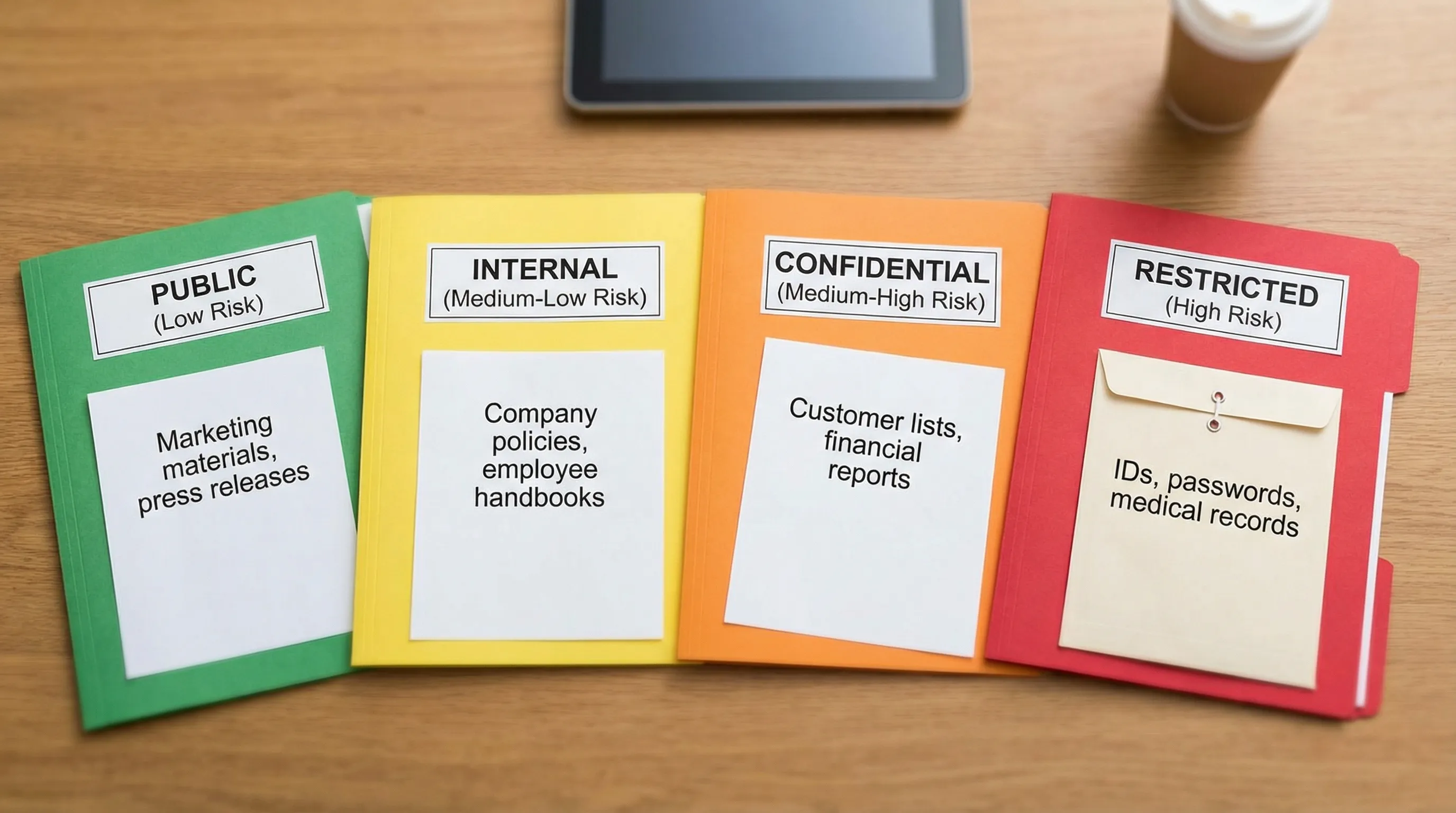
Agree on a small number of labels that tell staff what to do next. Four levels is usually enough.
Control
Apply security controls that match the risk: least privilege access, secure sharing, encryption, retention limits, logging.
Prove
Keep evidence: policies, training attendance, access approvals, vendor due diligence, incident logs, and disposal records.
The goal is not paperwork. The goal is consistent decisions.
Confidentiality data classification and handling rules (a team-ready table)
Use a standard like the one below, then tailor examples to your industry.
Classification | Typical examples | Who can access | Storage | Sharing rule | Disposal rule |
Public | Published marketing, approved press statements | Anyone | Public website or approved channels | No restrictions beyond brand controls | Normal disposal |
Internal | Policies, internal org charts, routine ops updates | Employees and approved contractors | Company-managed storage | Share internally only, avoid public links | Delete per retention schedule |
Confidential | Customer lists, employee records, contracts, financial reports | Role-based access only | Encrypted or access-controlled repositories | Share only with named recipients, require approved channels | Secure deletion, record disposal |
Restricted (High Risk) | IDs, banking details, health info, legal privilege, credentials | Strict need-to-know | Strong access controls plus logging | Prohibit informal channels, require additional approval | Secure destruction with verification |
Two notes that matter in day-to-day work:
“Internal” is not “safe to forward.” It still requires controlled channels.
“Restricted” should trigger extra steps (approval, stronger access controls, and tighter monitoring).
Handling rules every team should know (by workflow)
Confidentiality failures happen at specific moments: collecting, storing, using, sharing, and disposing. Train teams on what to do in each moment.
Rule 1: Collect only what you need, and say why you need it
Confidentiality begins before storage. If you collect unnecessary data, you create unnecessary risk.
Operational habits to enforce:
Use forms that avoid “free text” where sensitive details get pasted.
If a document request includes IDs or banking details, ensure there is a clear purpose and a secure intake method.
Avoid collecting duplicates across departments “just in case.”
This aligns with data minimisation and purpose limitation concepts common to modern data protection regimes.
Rule 2: Default to least privilege access
If “everyone in the department” can access the file, you are assuming every role has a need-to-know. That assumption is usually false.
A workable minimum standard:
Access is granted based on role and task.
Access is time-bounded for projects and offboarding is prompt.
Shared accounts are avoided, and admin access is tightly controlled.
For security control references, many organisations map their approach to frameworks like NIST SP 800-53 (Access Control and Audit controls are directly relevant).
Rule 3: Use company-approved storage, not “wherever it fits”
Confidentiality data should live in systems the organisation can manage: permissions, audit logs, backups, retention, and deletion.
Red flags to eliminate:
Personal Google Drive or iCloud
USB drives with no encryption
“Temporary” folders that become permanent archives
A practical policy line that works: if the company cannot revoke access quickly and confirm deletion, it is not an approved location for confidentiality data.
Rule 4: Do not use screenshots as a sharing method
Screenshots often bypass controls (labels, expiry, encryption, audit logs) and they spread quickly. They also tend to include more data than intended.
If you need help with a record:
Share a secure link with least privilege access.
Redact the data down to what is necessary.
Use case numbers or masked identifiers where possible.
Rule 5: Treat email as a high-risk channel
Email is not automatically “insecure,” but it is easy to misaddress, forward, or auto-sync to multiple devices.
Team-ready email rules:
Double-check recipients before sending Confidential or Restricted data.
Use secure sharing links instead of attachments when possible.
Do not forward chains that include sensitive details to “add someone in.” Create a new message with only what they need.
Never send passwords, one-time codes, or credentials over email.
Rule 6: Messaging apps are not a records system
Many teams use messaging apps because they are fast. Speed is not the problem. Lack of governance is.
Set a clear expectation:
Restricted data is prohibited in informal messaging channels.
Confidential data is only shared via approved tools with access controls and retention rules.
Business decisions and approvals must be captured in official systems.
Rule 7: Remote work needs “screen discipline” and clean desk habits
Confidentiality incidents in remote settings are often visual, not technical: family members, visitors, rideshare drivers, or neighbouring desks.
Non-negotiable habits:
Lock screens when stepping away.
Use privacy screens in public locations.
Avoid taking calls involving Restricted data in public spaces.
Keep printed documents out of view and store them securely.

Rule 8: Printing is a disclosure event
Printing turns a controlled digital record into a physical risk.
Minimum print controls:
Print only when necessary.
Use secure print release if available.
Collect prints immediately.
Store in locked cabinets if kept overnight.
Shred using cross-cut shredding or secure destruction services.
Rule 9: Meetings and calls must follow “minimum necessary”
Confidentiality data leaks through conversation more often than people realise.
Meeting rules that work:
Invite only roles that need the information.
Use anonymised case references when possible.
Avoid putting full identifiers on screen during presentations.
If the meeting is recorded, treat the recording as Confidential by default and restrict access.
Rule 10: Third-party sharing must be controlled, documented, and reviewed
Vendors are part of your operating environment. If they handle your confidentiality data, you need clear controls.
At minimum, require:
A written agreement that covers confidentiality, security safeguards, breach notification, and retention or deletion.
A clear scope: what data, for what purpose, for how long.
Evidence of due diligence proportional to risk.
This matters even more when data flows across borders or to group companies.
If your organisation is expanding operations internationally, align confidentiality handling with corporate governance and compliance expectations in the destination jurisdiction. For example, organisations structuring entities in the UAE may benefit from working with a partner that emphasises governance and transparent lifecycle management, such as UAE company setup and corporate structuring support, while ensuring data access and disclosures remain controlled.
Quick “channel rules” teams can remember
These rules reduce confusion without requiring staff to become security experts.
Channel | Suitable for Internal | Suitable for Confidential | Suitable for Restricted | Safer alternative |
Public email to external parties | No | Sometimes (with controls) | No | Secure link with least privilege, encrypted transfer |
Personal email | No | No | No | Company email and approved storage |
Informal messaging apps | Sometimes | Rarely (policy-defined) | No | Approved collaboration tools with access controls |
USB drive | Sometimes (if encrypted) | Only if encrypted and approved | Avoid | Secure file transfer and access-controlled storage |
Printed copies | Yes (limited) | Yes (controlled) | Avoid | Secure digital access and redaction |
Make confidentiality real: three implementation steps that stick
Policies alone do not change behaviour. Teams need defaults and reinforcement.
1) Build “handling rules” into templates and systems
Instead of relying on memory:
Add confidentiality labels to document templates.
Standardise secure sharing links.
Use naming conventions that make sensitivity obvious.
2) Train by role, not by generic awareness
A receptionist, a customer service representative, an HR officer, and a systems administrator face different confidentiality risks.
Effective training is scenario-based:
“You received an email asking for employee TRNs, what do you do?”
“A customer asks for a copy of a statement, how do you verify identity?”
“A manager wants the full staff list for an event, do they need it?”
3) Audit the basics quarterly
You do not need heavy tooling to find common gaps. Review:
Who has access to shared folders and mailboxes.
Whether offboarding removes access promptly.
Whether Restricted data appears in email attachments or uncontrolled folders.
For organisations building a broader compliance programme in Jamaica, PLMC’s resources like the Data Protection Jamaica compliance roadmap for 2026 can help align operational privacy work with governance and accountability.
What to do when confidentiality data might have been exposed
Speed and discipline matter. Even if you are not sure an incident is “reportable,” treat it seriously.
A simple response pattern many organisations adopt (aligned with guidance like NIST SP 800-61):
Contain: stop the sharing, disable links, recall messages where possible, remove access.
Preserve evidence: keep logs, emails, timestamps, and involved files.
Report internally: notify the right person or team immediately (privacy lead, security lead, management).
Assess impact: what data, whose data, who received it, and what harm could occur.
Remediate and learn: fix the process that allowed the exposure.
The key cultural rule: reporting is encouraged, not punished. Silence is what turns small mistakes into major incidents.
Where teams usually get stuck (and how to unblock them)
If your teams struggle to follow confidentiality rules, the problem is usually one of these:
Unclear ownership: no one is accountable for data classification and access decisions.
Too many “exceptions”: staff believe confidentiality rules apply only when convenient.
No approved tools: people use personal channels because official channels are slow or unavailable.
Fixing confidentiality data handling is a governance project as much as a security project. It requires clear decision-makers, workable processes, and training tied to real workflows.
Turning confidentiality into a standard your organisation can defend
A strong confidentiality posture is not defined by a single policy. It is defined by repeatable handling rules that teams follow under pressure.
If you want support designing a confidentiality data handling framework, training teams, or integrating privacy and security controls into a wider GRC programme, Privacy & Legal Management Consultants Ltd. can help you move from awareness to implementation through advisory services, risk assessment tools, and practical training tailored to Jamaican organisations.