

What to Review Before Launching a New Customer Portal
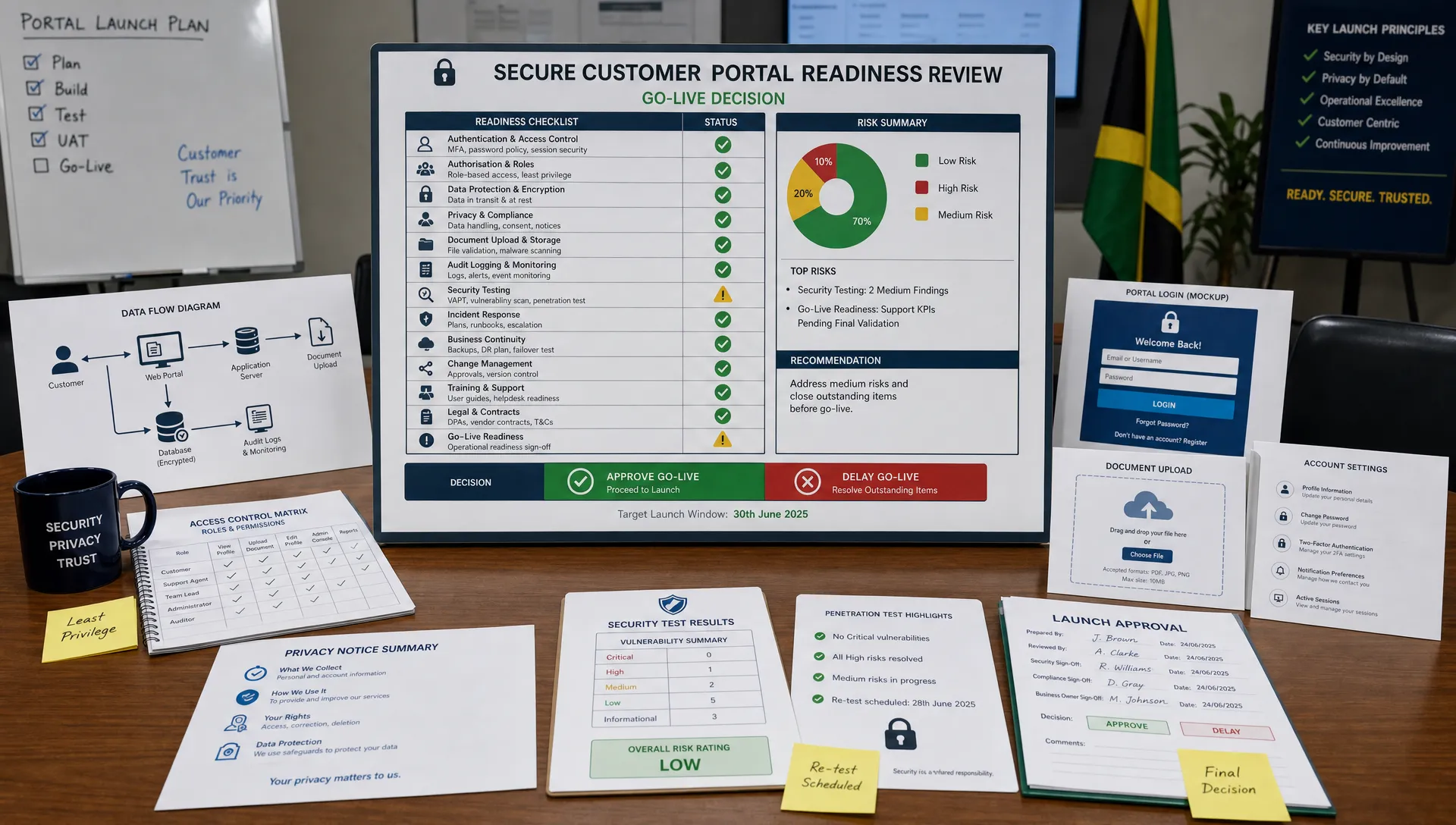
A new customer portal can make service faster, reduce manual processing, and give customers a better way to manage their relationship with your organisation. It can also concentrate some of your highest-risk data processing in one place: identity details, account history, documents, payment information, support messages, preferences, and sometimes sensitive personal data.
That is why a portal launch should not be treated as a purely technical milestone. It is a governance, risk, privacy, and security decision. In Jamaica, the stakes are even higher now that organisations are expected to comply with the Data Protection Act, 2020 and demonstrate that personal data is handled lawfully, transparently, and securely.
Before go-live, the key question is not only “Does the portal work?” It is “Can we prove that this portal protects customers, supports compliance, and reduces risk?” The following review areas will help leadership, legal, compliance, IT, cyber security, and operations teams make that decision with confidence.
Start with the portal’s purpose and data flows
Every review should begin with a clear definition of what the portal is meant to do. If the business purpose is vague, the data collection will usually become excessive, the user experience will feel confusing, and compliance evidence will be weak.
Document the customer journeys that the portal supports. For example, users may register an account, update contact details, upload documents, make payments, submit requests, communicate with support teams, or view account history. Each journey should be mapped to the data collected, the reason for collection, the system that stores it, and the people or vendors that can access it.
This mapping is essential for data protection compliance because it helps your organisation prove purpose limitation, data minimisation, security planning, retention decisions, and vendor accountability. It also gives your IT team a more accurate picture of what needs to be protected.
Review area | Questions to answer before launch | Evidence to keep |
Data collection | What personal data is collected at each step, and why is it necessary? | Data inventory, form-field review, business justification |
Data storage | Where is portal data stored, backed up, and archived? | System architecture, hosting documentation, backup policy |
Data sharing | Which internal teams, vendors, or partners receive portal data? | Data flow map, vendor list, processor agreements |
Data access | Who can view, edit, export, or delete customer records? | Role matrix, access control policy, audit log configuration |
Data retention | How long is each category of data kept, and what triggers deletion? | Retention schedule, deletion workflow, legal hold process |
A common mistake is reviewing only the database fields and forgetting about hidden data flows such as analytics tools, error logs, chat widgets, email notifications, customer support exports, and payment redirects. These may all involve personal data and should be included in the review.
Check lawful processing, privacy notices, and consent
A customer portal should clearly explain what personal data is collected, why it is used, how long it is kept, who it may be shared with, and what rights customers have. This is not only a legal requirement in many contexts, it is also a trust signal. Customers are more likely to use a portal when they understand what is happening to their information.
Under Jamaica’s Data Protection Act, 2020, organisations should be able to show that personal data is processed fairly, lawfully, transparently, and for specific purposes. The Office of the Information Commissioner is an important reference point for organisations reviewing their obligations in Jamaica.
Before launch, review whether the portal privacy notice is easy to find at account creation, login, and key data collection points. If the portal collects optional information, uses marketing preferences, enables profiling, or integrates analytics, the consent and preference mechanisms should be carefully tested. Consent should not be bundled into unrelated terms, and customers should not be surprised by secondary uses of their data.
Your privacy notice also needs to be written for real users, not only for lawyers. PLMC has previously discussed what users look for first on privacy policy pages, including clarity on the data collected, the purpose of processing, and how users can exercise control. Those same principles apply inside a customer portal.
Review account security and access controls
Customer portals are frequent targets because they provide direct access to personal and transactional information. If attackers compromise portal accounts, they may be able to access customer records, submit fraudulent requests, change contact details, or obtain documents.
Before go-live, test the entire account lifecycle. Registration, login, password reset, multi-factor authentication, session timeout, account lockout, email change, mobile number change, and account closure all deserve review. Weaknesses often appear in recovery flows because teams focus more on the login page than on “forgot password” or “change email” functions.
Access control should be reviewed from both the customer and employee perspectives. Customers should only see their own information. Employees should only see the information needed for their role. Privileged administrator accounts should be limited, monitored, and protected with strong authentication.
Use recognised security references to structure testing. The OWASP Top 10 remains a useful guide for common web application risks, including broken access control, injection, authentication failures, and security misconfiguration. For a broader governance view, the NIST Cybersecurity Framework can help organisations align cyber security activities with risk management.
Test cyber security, resilience, and incident readiness
A portal that passes functional testing can still fail a security review. Security testing should happen before launch, not after customers have already uploaded sensitive information.
At minimum, confirm that the portal has gone through vulnerability scanning, secure configuration review, and role-based access testing. For higher-risk portals, especially those handling financial, health, identity, or large-scale customer information, independent penetration testing should be considered. API endpoints should be tested as carefully as the user interface because many portal breaches occur through poorly protected APIs.
Encryption should be reviewed in transit and at rest. Logging should capture meaningful security events without unnecessarily exposing sensitive data inside logs. Backup and recovery procedures should be tested, not merely documented. If the portal becomes unavailable, the business should know how customer service will continue and how customers will be informed.
Incident response also needs to be portal-specific. Your plan should explain who investigates suspected unauthorised access, who decides whether notification is required, who communicates with affected customers, and who preserves evidence. A generic cyber incident plan may not be enough if it does not account for the portal’s actual data flows and service dependencies.

Validate customer rights and data management workflows
A customer portal can either make data subject rights easier to manage or create operational confusion. Before launch, decide how customers will request access to their data, correct inaccurate information, update preferences, object to certain processing where applicable, or ask questions about privacy practices.
If the portal allows customers to change their own information, the workflow should include controls to prevent fraud. For example, changing an email address, bank account, authorised contact, or delivery address may require additional verification. Convenience should not override account security.
Your organisation should also be ready to respond when portal data appears in a request. Can staff export the right information without including another customer’s data? Can they identify whether data sits in the portal, CRM, archived records, support tickets, or vendor systems? Can corrections made in the portal synchronise with other business systems?
Retention deserves special attention. Portals often keep data because it is technically easy to store it, not because the organisation still has a lawful or operational need. Define retention rules for inactive accounts, uploaded documents, messages, audit logs, failed registration attempts, and identity verification records. If records must be retained for legal, regulatory, accounting, anti-money laundering, or dispute purposes, document the reason clearly.
Vet vendors, integrations, and cross-border transfers
Most customer portals depend on third parties. These may include cloud hosting providers, developers, payment processors, identity verification tools, customer support platforms, email services, analytics providers, cyber security tools, and managed IT providers.
Each vendor should be reviewed before launch. Do not wait until procurement renewal. If a vendor processes personal data on your behalf, your organisation should understand what data the vendor receives, where it is processed, what security controls are in place, whether sub-processors are used, and how quickly the vendor must report incidents.
Cross-border data transfers also require attention. If customer data is hosted, accessed, supported, or backed up outside Jamaica, assess the legal and contractual basis for that transfer. Organisations with customers, partners, or operations connected to the European Union should also consider whether the GDPR applies. GDPR Jamaica discussions are often relevant for businesses that serve international clients, but GDPR should not be treated as a substitute for local Data Protection Act obligations.
Vendor review is not only a privacy task. It should involve legal, procurement, IT, risk, and the business owner. A portal can be technically secure but still expose the organisation if contracts, service levels, audit rights, confidentiality clauses, and incident notification obligations are weak.
Review accessibility, usability, and customer trust
A secure portal that customers cannot understand will create support burdens and trust problems. Accessibility and usability should be reviewed before launch, especially for services that customers are expected or required to use.
Test the portal on mobile devices, slower connections, and common browsers. In Jamaica and across the Caribbean, many users rely heavily on mobile access, so a desktop-only review is not enough. Forms should be clear, error messages should be helpful, and customers should know when an action has been successfully completed.
Accessibility standards such as the Web Content Accessibility Guidelines provide a useful benchmark. Review colour contrast, keyboard navigation, form labels, document uploads, screen reader compatibility, and timeouts. Privacy and accessibility are connected because customers should not have to disclose extra information or seek unnecessary assistance simply because the portal is difficult to use.
Trust also depends on tone. Avoid vague statements such as “We may use your data for business purposes” without context. Explain important actions in plain language, such as why identity verification is required, why certain documents are requested, and how customers can get help.
Prepare governance, training, and internal sign-off
A portal launch should have a named business owner and clear sign-off from the relevant functions. Depending on the organisation, this may include executive leadership, legal, compliance, IT, cyber security, operations, customer service, records management, and the data protection lead or data protection officer where applicable.
Training is often overlooked. Customer-facing staff should understand how the portal works, what privacy commitments have been made, how to verify customers, how to escalate suspicious activity, and how to respond to privacy questions. Administrators need additional training on secure access, audit trails, privilege management, and incident reporting.
For regulated sectors, the portal review should also account for industry-specific obligations. Financial institutions, real estate professionals, gaming entities, and other supervised businesses may need to consider anti-money laundering controls, know-your-customer processes, sanctions screening, or suspicious transaction escalation. These requirements should be built into portal workflows without collecting more personal data than necessary.
A strong governance review produces evidence. Meeting notes, risk assessments, sign-off records, testing results, vendor due diligence, privacy notices, and training records may all be useful if the organisation later needs to show accountability.
Customer portal launch readiness checklist
Use the following checklist as a practical final review before go-live. It is not a substitute for legal advice, but it can help teams identify gaps that should be resolved before customers are invited into the portal.
Area | Ready for launch when | Typical owner |
Business purpose | The portal’s purpose, customer journeys, and success criteria are documented | Business owner |
Data protection | Data flows, lawful basis, privacy notice, rights workflows, and retention rules are reviewed | Privacy, legal, compliance |
Security | Authentication, access controls, vulnerability testing, logging, and incident response are validated | IT, cyber security |
Vendors | Contracts, security assurances, data locations, and incident obligations are confirmed | Procurement, legal, IT |
Operations | Customer support, escalation routes, staff training, and fallback procedures are ready | Operations, customer service |
Governance | Risks are documented, decisions are approved, and launch sign-off is recorded | Executive sponsor, risk team |
Red flags that should delay launch
Some issues are serious enough to pause the launch until they are fixed. A short delay is usually less costly than a privacy incident, customer trust failure, or regulatory problem after go-live.
The team cannot clearly explain what personal data the portal collects and why.
Customers are asked for information that is not needed for the stated service.
The privacy notice is missing, difficult to find, or inconsistent with actual data flows.
Administrator accounts are shared or not protected by strong authentication.
Customers can access another customer’s data through URL changes, search functions, or account linking errors.
Vendor contracts do not address confidentiality, security, sub-processors, data location, and incident notification.
Logs, exports, screenshots, or support tickets expose more personal data than necessary.
Staff have not been trained on privacy questions, suspicious activity, or incident escalation.
If any of these red flags appear, treat them as business risks rather than technical defects. They affect customer trust, regulatory compliance, and the organisation’s ability to govern its data responsibly.
Frequently Asked Questions
Does every customer portal need a privacy impact assessment? Not every portal will carry the same level of risk, but a privacy or data protection impact assessment is strongly recommended when the portal processes sensitive information, financial data, identity documents, large volumes of customer records, or data involving vulnerable individuals.
Is cyber security testing enough for Data Protection Act compliance? No. Security testing is essential, but data protection compliance also requires attention to purpose, transparency, lawful processing, data subject rights, retention, vendor management, staff training, and accountability evidence.
Should GDPR be considered when launching a portal in Jamaica? It depends on your customers and activities. If the portal targets or monitors individuals in the European Union, GDPR may be relevant. Even when GDPR does not apply, its privacy-by-design practices can still support stronger governance alongside Jamaica’s Data Protection Act, 2020.
Who should approve a customer portal before launch? Approval should not sit with IT alone. A sound launch decision usually involves the business owner, IT, cyber security, legal, compliance, privacy, operations, customer service, and executive leadership for higher-risk portals.
What documents should be kept after the review? Keep data flow maps, privacy notices, risk assessments, security test results, access control records, vendor due diligence, retention schedules, staff training records, incident response procedures, and formal launch sign-off.
Need an independent pre-launch review?
Launching a customer portal is a major step in your organisation’s digital maturity. It is also a point where data protection, cyber security, corporate governance, operational risk, and customer trust meet.
If your organisation is preparing to launch or upgrade a portal, Privacy & Legal Management Consultants Ltd. can support data protection implementation, governance reviews, privacy awareness, compliance planning, and risk-focused training for teams in Jamaica. A structured review before go-live can help you identify gaps early, strengthen accountability, and launch with greater confidence.