

Data Privacy Risk Assessment: A Step-by-Step Method

A strong privacy programme is not built on policies alone, it is built on evidence that you understand your data, the risks around it, and the controls you use to reduce harm. That is exactly what a data privacy risk assessment delivers: a repeatable way to identify where personal data could be misused, lost, exposed, or processed unfairly, and to prioritise what to fix first.
For Jamaican organisations working toward Data Protection Act alignment (and for any business handling employee, customer, patient, or member information), a practical risk assessment method reduces uncertainty, supports better decision-making, and helps demonstrate accountability.
What a data privacy risk assessment is (and what it is not)
A data privacy risk assessment evaluates how the way you collect, use, share, store, and dispose of personal data could lead to harm, such as:
Unauthorised access (breach, insider misuse, excessive admin privileges)
Over-collection or use beyond the stated purpose
Inaccurate data affecting decisions (credit, hiring, benefits)
Inappropriate disclosure (misdirected emails, insecure file sharing)
Weak vendor practices (cloud services, payroll providers, call centres)
Cross-border transfer gaps (insufficient safeguards or unclear contracts)
It is closely related to, but different from:
Cybersecurity risk assessments, which focus primarily on systems and technical threats (important, but not the full privacy picture).
DPIAs (Data Protection Impact Assessments), which are typically deeper assessments for high-risk processing, new projects, or sensitive data. A privacy risk assessment can feed into a DPIA when needed.
If you want a recognised reference point for structure, the NIST Privacy Framework is a helpful, risk-based model that many organisations adapt.
When you should perform a privacy risk assessment
You should run a privacy risk assessment on a defined schedule (for example, annually) and also when change occurs. Common triggers include:
Launching a new product, app, website form, or loyalty programme
Implementing HR, payroll, time-and-attendance, or CRM systems
Moving to cloud storage or adopting new collaboration tools
Introducing biometrics, CCTV upgrades, monitoring, or call recording
Outsourcing functions to vendors locally or overseas
Experiencing a near-miss or incident (misdirected email, lost laptop)
Data Privacy Risk Assessment: a step-by-step method
The method below is designed to be practical for Jamaican organisations of different sizes, while still producing regulator-ready evidence.
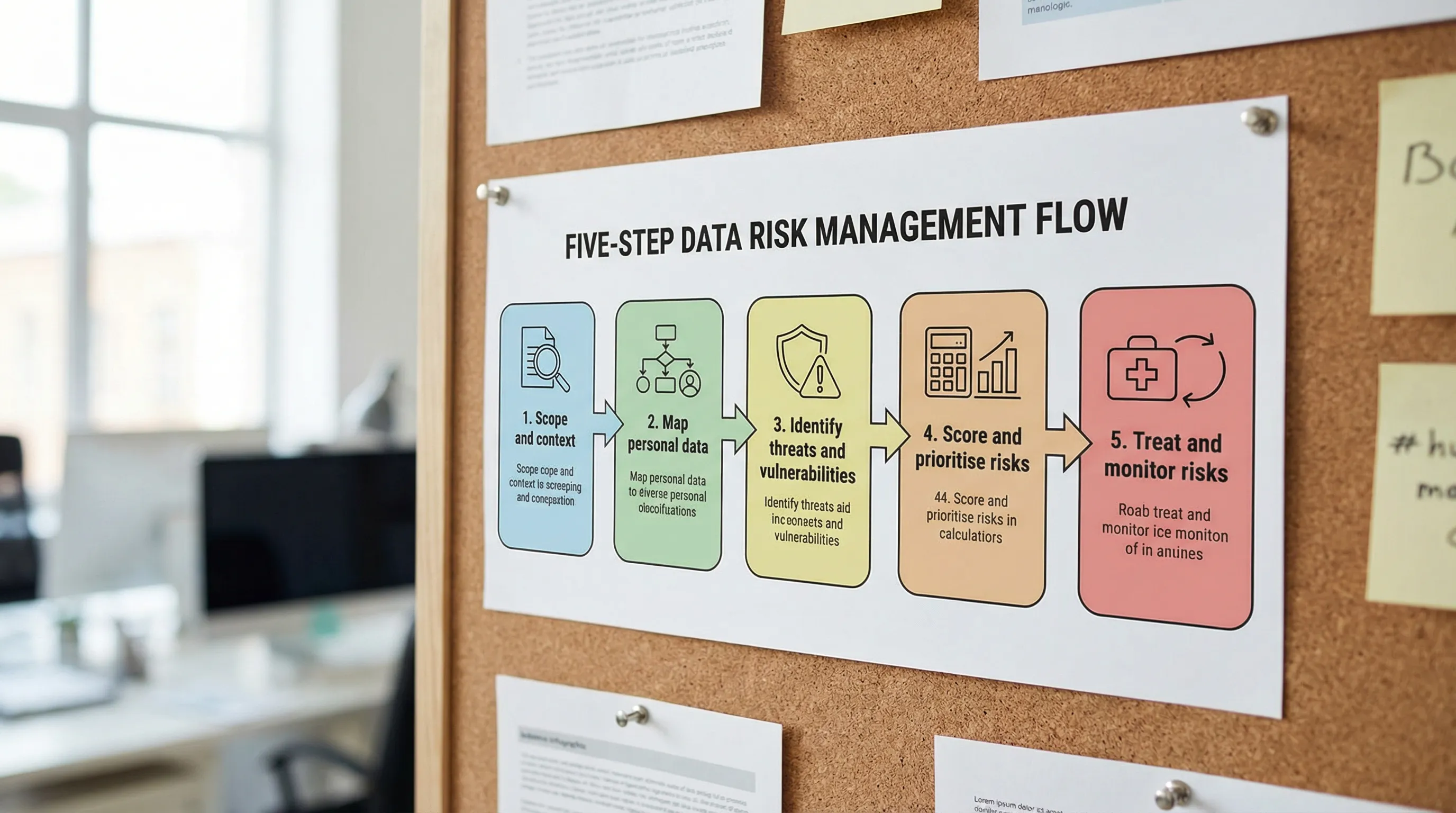
Step 1: Define scope, objectives, and risk criteria
Start by clearly stating what you are assessing. A good scope is specific enough to act on, for example:
“Customer onboarding and KYC process (in-branch and online)”
“HR employee lifecycle data from recruitment to offboarding”
“Marketing database and email campaigns”
Then set risk criteria so everyone scores consistently. Document:
Risk owners (business) and contributors (IT, HR, Legal, Compliance)
What “impact” means for your organisation (harm to individuals, legal exposure, reputational harm, operational disruption)
What “likelihood” means (frequency, ease of exploitation, control maturity)
Thresholds for “low / medium / high” risk and escalation rules
This step prevents the most common failure in assessments: vague scoring that cannot be defended later.
Step 2: Build a processing inventory for the scoped activity
For the scoped process, document the essentials of the processing activity. You can do this as a mini “record of processing” even if you are not yet maintaining a full enterprise register.
Capture:
Categories of personal data (names, TRN, contact details, health data, financial info, IDs)
Data subjects (customers, employees, students, patients)
Purpose(s) of processing and intended outcomes
Where data is collected from (forms, apps, partners)
Where it is stored (systems, paper files, shared drives)
Who it is shared with (vendors, group companies, regulators)
Retention expectations (how long and why)
Keep this factual. You are building the foundation for risk identification.
Step 3: Map the data flow (including “unofficial” routes)
A data flow answers: where does personal data travel, and where can it leak?
Create a simple flow that includes:
Collection points (web forms, WhatsApp submissions, call centres)
Transfers (email attachments, USB drives, SFTP, API integrations)
Storage locations (cloud folders, local devices, filing cabinets)
Access points (roles, shared logins, admin accounts)
Outputs (reports, customer communications, analytics dashboards)
In many organisations, the highest risks hide in informal habits such as staff sending documents via personal email, saving files to desktops, or sharing spreadsheets through consumer file-sharing links.
Step 4: Identify privacy threats and vulnerabilities
Now list what could go wrong, and why it could go wrong.
A useful way to structure this is:
Threats: breach, accidental disclosure, insider misuse, excessive collection, unauthorised secondary use, weak vendor handling, inaccurate decisions, failure to honour rights requests
Vulnerabilities: lack of access control, no retention schedule, no encryption, weak approval process, missing contracts, unclear notices, poor training, uncontrolled exports
Avoid generic entries like “hackers”. Instead, connect threats to your actual flow, for example “customer IDs emailed as attachments to a shared mailbox” or “HR files stored in an unlocked cabinet accessible to multiple departments”.
Step 5: Identify existing controls (what already reduces risk)
List controls that already exist, because risk is assessed based on reality, not intent.
Controls may include:
Policies and procedures (acceptable use, retention, incident response)
Technical controls (MFA, encryption, access logging, DLP tools)
Organisational controls (training, approvals, segregation of duties)
Vendor controls (contracts, due diligence, audits)
Legal and privacy controls (notices, consent where appropriate, lawful basis documentation)
Be honest here. A policy that is not implemented or not followed is not an effective control.
Step 6: Score risks using a consistent likelihood and impact model
Use a simple scoring model that your organisation can repeat. A 1 to 5 approach works well.
Here is an example scoring matrix you can adapt.
Score | Likelihood (example definition) | Impact on individuals and organisation (example definition) |
1 | Rare, strong controls, hard to exploit | Minimal harm, limited exposure, quickly recoverable |
2 | Unlikely, controls mostly effective | Low harm, small dataset, limited legal or operational impact |
3 | Possible, control gaps exist | Moderate harm, reportable incident possible, disruption likely |
4 | Likely, weak controls or frequent handling | High harm, sensitive data, significant legal and reputational damage |
5 | Almost certain, no controls, repeated exposure | Severe harm, large-scale exposure, major regulatory and financial impact |
Then calculate a risk rating (for example, Likelihood x Impact). Document the rationale in plain language. This narrative is what makes the assessment defensible.
Step 7: Prioritise by “highest harm first”, not by convenience
Once risks are scored, prioritise using two lenses:
Severity and scale of harm to people (especially for sensitive data)
Speed to reduce exposure (quick wins that materially reduce risk)
A practical approach is to tag each risk with:
Priority: High, Medium, Low
Risk type: Security, fairness/lawfulness, transparency, retention, vendor, rights handling
Timeframe: 0 to 30 days, 31 to 90 days, 90+ days
This turns your assessment into an action plan, not a report that sits on a shelf.
Step 8: Define treatment options and select controls
For each priority risk, choose a treatment option:
Mitigate: implement controls (preferred for most privacy risks)
Avoid: stop the processing activity or redesign it
Transfer: shift some risk contractually (for example, stronger vendor obligations), noting you still retain accountability
Accept: only with documented justification and approval by the right authority
Examples of practical treatments:
Replace spreadsheet sharing with role-based access in a controlled system
Enforce MFA and remove shared accounts
Update privacy notices to match actual use and disclosures
Implement retention rules and secure disposal (paper and digital)
Strengthen vendor contracts (confidentiality, breach notification, sub-processor approvals)
Reduce collected fields to what is necessary (data minimisation)
Add a rights request workflow (intake, verification, tracking, response templates)
If you use security standards internally, align privacy controls with them. For example, ISO 27001 style access management and logging controls can directly reduce privacy breach risks.
Step 9: Document residual risk and approvals
After controls are proposed (or implemented), record the residual risk (what remains) and who approved it.
This is a key accountability artefact. It answers:
What did we decide?
Why did we decide it?
Who accepted the remaining risk?
When will we review it?
For higher-risk processing, consider whether you need a more formal DPIA approach. The UK ICO DPIA guidance is a widely used reference for structuring high-risk assessments, even outside the UK, because it is practical and clear: see the ICO DPIA resources.
Step 10: Monitor, test, and refresh the assessment
Risk changes when your business changes.
Set a refresh cadence and triggers:
Refresh cycle (for example, every 12 months for core processes)
Trigger events (new vendor, system upgrade, new data category, incident)
Testing (access reviews, vendor reviews, tabletop breach exercises)
A simple improvement metric is to track:
Number of high risks reduced to medium/low
Time to close corrective actions
Training completion for roles handling sensitive data
Incident trends (near-misses count as signals)
A worked example (condensed): customer onboarding and ID collection
Consider a business that collects government-issued IDs and proof of address for onboarding.
Typical risks uncovered:
IDs are received via email attachments to a shared inbox (high likelihood, high impact)
Staff save ID scans to desktops for “quick access” (likely, high impact)
Vendor used for document storage has unclear sub-processors (possible, high impact)
Customers are not clearly told how long IDs are retained (possible, moderate impact)
Typical treatments:
Provide a secure upload portal with expiring links
Restrict inbox access, disable auto-forwarding, implement retention rules
Enforce device encryption and block local storage where feasible
Update privacy notice and retention schedule, train frontline staff
Update vendor contract and perform due diligence on sub-processors
The value is not just compliance. These changes reduce fraud exposure, improve customer trust, and simplify incident response.
What good “evidence” looks like after your assessment
If you are ever asked to demonstrate accountability, you want to show more than intentions. Strong evidence includes:
A dated risk assessment report with scope, method, and scoring criteria
Data flow diagrams for key processes
A risk register with owners and deadlines
Remediation tickets or action plans showing progress
Updated notices, contracts, and procedures
Training records for relevant teams
Access review logs and vendor review outcomes
This is the difference between “we take privacy seriously” and “here is proof”.

Frequently Asked Questions
What is the main goal of a data privacy risk assessment? The goal is to identify where personal data processing could cause harm to individuals or create legal, operational, or reputational exposure, then prioritise controls to reduce those risks.
How often should we do a privacy risk assessment? At least annually for core processes, and anytime you introduce a major change such as a new system, new vendor, new data type, or a new way of using existing data.
Is a privacy risk assessment the same as a DPIA? Not always. A DPIA is typically more formal and is used for high-risk processing or new initiatives. A privacy risk assessment can be a lighter, repeatable method that also feeds into DPIAs when needed.
Do small Jamaican businesses need to do this, or only large companies? Any organisation handling personal data benefits. Smaller businesses often have fewer controls and more informal data sharing, which can increase risk. A scoped assessment keeps the effort manageable.
What should we do first if we find high risk issues? Focus on quick actions that materially reduce exposure, such as tightening access, stopping insecure sharing, improving retention and disposal, and strengthening vendor controls.
Need help running a privacy risk assessment in your organisation?
Privacy & Legal Management Consultants Ltd. (PLMC) supports Jamaican organisations with data protection implementation, privacy awareness training, and practical risk assessment tools to help meet Data Protection Act expectations.
If you want support scoping your assessment, building a risk register, or prioritising remediation, explore PLMC resources at privacymgmt.org or request a consultation via the site’s contact options.