

Data and Privacy Protection: A 30-Day Starter Plan

Most privacy programmes fail for a simple reason: they try to boil the ocean. Data and privacy protection is not one project, it is a set of repeatable habits and controls that your organisation can build quickly if you focus on the right first moves.
This 30-day starter plan is designed for Jamaican organisations that want a practical, defensible baseline aligned to the Data Protection Act, 2020 and good governance practice, without waiting for a perfect future state. You will finish the month with clear ownership, a working data inventory, updated notices and policies, a basic vendor and security posture, and a tested way to handle incidents and rights requests.
Helpful reference: read the Data Protection Act, 2020 (Jamaica) and keep it open as you implement.
What “done” looks like after 30 days
A realistic 30-day outcome is a minimum viable privacy programme. That means you can demonstrate (internally, to customers, and to regulators if required) that you understand your data, you have assigned accountability, and you are actively reducing risk.
By Day 30, aim to have:
A named privacy lead (and backups) with management support.
A simple but usable data inventory (what you collect, where it lives, who can access it, and why you need it).
Updated privacy notices and core internal policies (retention, access control, incident response).
A shortlist of high-risk vendors and a contract check for the top few.
A basic rights request workflow and an incident playbook, tested with a short tabletop exercise.
A training plan and an initial awareness session delivered.
Before you start (2 hours of setup that saves days)
Pick your scope and keep it tight
Choose one business unit or one product line if your organisation is large. If you are an SME, include the whole business but limit the first pass to your “most sensitive” processes, typically:
HR and payroll
Customer onboarding and KYC
Marketing databases and mailing lists
Online forms and website analytics
CCTV and access control logs
Assign roles (even if they are part-time hats)
You do not need a large privacy office. You do need clarity.
Executive sponsor: approves priorities and unblocks resources.
Privacy lead (or privacy coordinator): drives the 30-day plan.
IT/Security owner: implements access and security actions.
Process owners (HR, Sales, Operations): confirm what data is used and why.
Legal/Compliance support (internal or external): sanity-check notices, contracts, and decisions.
Create a single folder for evidence
Set up a shared location (with restricted access) for everything you produce: inventories, policies, meeting notes, vendor assessments, and training records. Evidence is part of compliance.
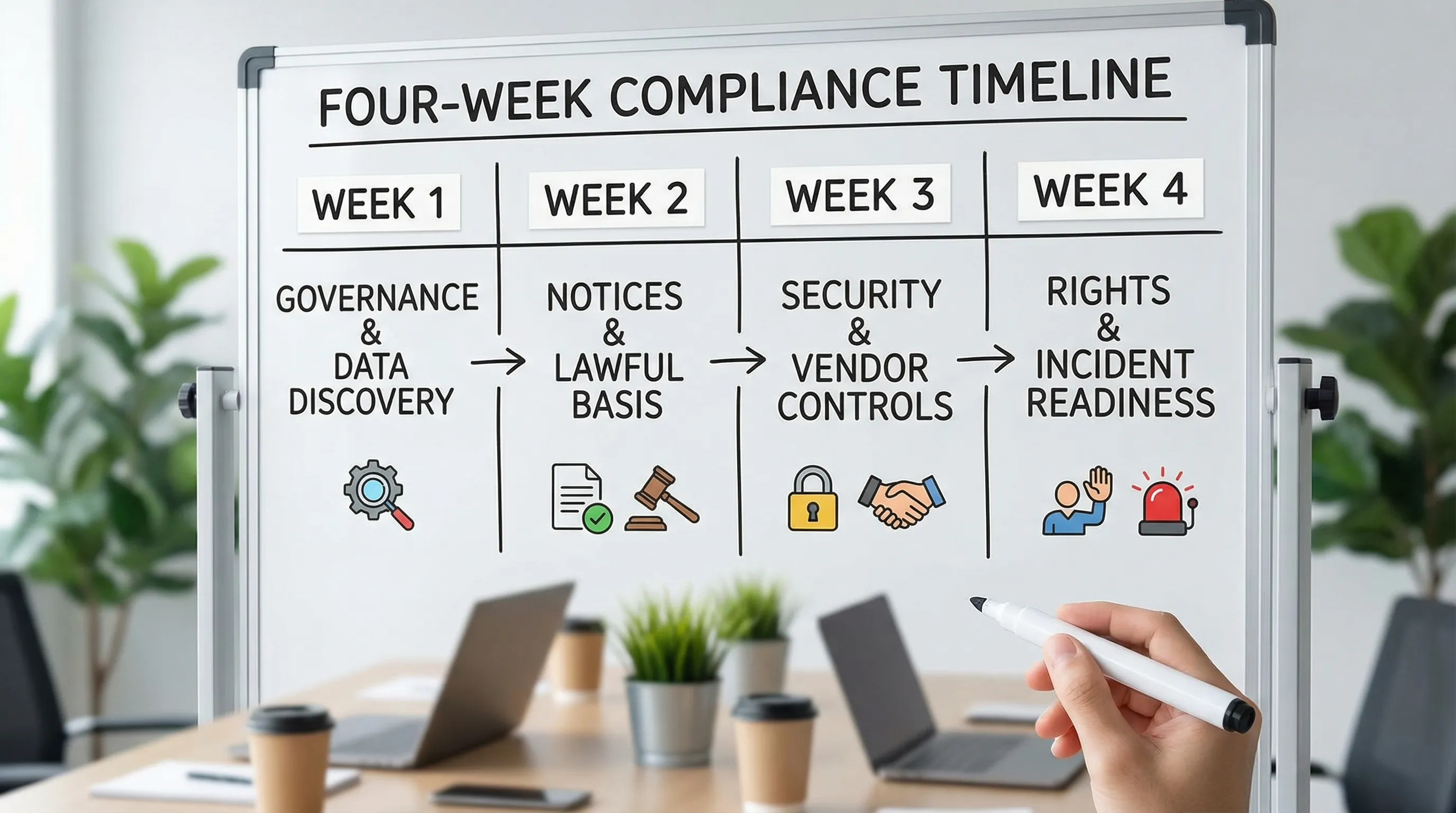
The 30-day plan at a glance
Week | Focus | Primary output | Time estimate |
Week 1 | Governance and data discovery | Owners, quick data map, priority risks | 6 to 10 hours |
Week 2 | Lawful use and transparency | Updated notices, retention decisions, core policies | 6 to 10 hours |
Week 3 | Security and vendor controls | Access fixes, top vendor checks, risk actions | 6 to 12 hours |
Week 4 | Rights and incident readiness | Rights workflow, incident playbook, tabletop, training | 6 to 12 hours |
Week 1 (Days 1 to 7): Governance + data discovery sprint
Day 1: Kick-off with a “privacy in plain language” brief
Hold a 30 to 45 minute meeting with the sponsor and process owners. Cover three points only:
What counts as personal data in your context (customers, staff, contractors, visitors).
Why the organisation is doing this now (risk reduction, trust, compliance).
What you will deliver in 30 days (minimum viable privacy programme).
End the meeting by agreeing your scope and identifying the top 5 systems or repositories that store personal data (for example, HR system, CRM, shared drive, email, accounting package).
Days 2 to 4: Build a first-pass data inventory (good enough beats perfect)
Create a simple inventory using a spreadsheet. Your first pass should answer:
Data category: customer, employee, supplier, website visitor
What you collect: names, contact details, IDs, payment info, medical info (if any)
Where it is stored: system name, cloud service, filing cabinet
Who can access it: teams and roles
Why you need it: onboarding, payroll, fraud prevention, service delivery
How long you keep it: even a rough estimate is better than blank
If you want a recognised structure, the NIST Privacy Framework is a useful reference for organising privacy management activities.
Day 5: Classify and prioritise risks (a fast triage)
Use a simple triage to decide what to fix first:
High impact: financial data, government-issued IDs, children’s data, health data
High exposure: shared inboxes, shared drives, spreadsheets emailed around
High volume: marketing lists, customer databases
High dependency: key vendors that run your core systems
Write down your top 10 risks as short statements (example: “Too many staff have access to the HR folder on the shared drive”).
Days 6 to 7: Two quick wins that build momentum
Choose two actions you can complete this week:
Turn on multi-factor authentication (MFA) for email and admin accounts where available.
Remove access for former staff and contractors (account clean-up).
These are not “privacy paperwork” tasks, they directly reduce the likelihood and impact of a breach.
Week 2 (Days 8 to 14): Lawful use, transparency, and retention
Days 8 to 9: Confirm your lawful grounds and stop unnecessary collection
For each high-priority processing activity in your inventory, confirm:
Why you collect the data (purpose)
Whether you truly need all fields (data minimisation)
Whether the purpose matches what people would reasonably expect
If a form asks for information you do not use, remove it. This is one of the fastest ways to reduce privacy risk.
Days 10 to 11: Update your privacy notice (and align it to reality)
Your privacy notice should reflect what you actually do, not what you hope to do. At minimum, ensure it clearly states:
What you collect and why
Who you share it with (including key service providers)
How long you keep it (or how you decide)
How individuals can contact you about their information
Publish it where it matters: website footer, sign-up forms, and employee onboarding packs.
Days 12 to 13: Set a basic retention approach
Many organisations keep personal data forever because it is “useful someday”. That is a liability.
Start with three retention bands and refine later:
Short: enquiries, unsuccessful applicants, routine visitor logs
Medium: customer records for active relationships
Long: records you must keep for legal, accounting, or regulatory reasons
Document the business reason for each band. The aim is consistency and defensibility.
Day 14: Create or refresh three core internal policies
Keep them short and usable:
Access control policy: who gets access, approval process, periodic review.
Data handling policy: rules for email, shared drives, portable storage, remote work.
Incident response policy: who to call, what to do first, how to escalate.
If you have ISO-aligned security goals, ISO/IEC 27001 is a widely recognised benchmark for information security management systems. The standard itself is paywalled, but high-level guidance is available via ISO.
Week 3 (Days 15 to 21): Security controls + vendor management (where real risk lives)
Privacy programmes collapse when they ignore operational reality. This week turns your inventory into control improvements.
Days 15 to 17: Tighten access and reduce data sprawl
Focus on the places where personal data leaks most often:
Shared drives and folders
Shared inboxes
Staff laptops and mobile devices
Email forwarding rules
Practical actions:
Restrict HR and finance folders to named roles.
Replace “everyone@company” access with group-based access.
Enforce screen locks and device encryption where available.
Breach costs vary by sector and incident type, but the global trend remains expensive. IBM’s research tracks the business impact of breaches year over year in its Cost of a Data Breach Report.
Days 18 to 20: Triage vendors (start with your top 10)
List your vendors that process personal data (cloud services, payroll providers, email marketing platforms, IT support, CCTV providers). For the top few, capture:
What data they receive
Where they host it (if known)
Whether you have a contract and what it says about confidentiality and security
Whether they use sub-processors
What happens when the contract ends (return, deletion)
You are not trying to complete a full audit in 30 days. You are trying to identify unacceptable gaps and prioritise contract updates.
Day 21: Do one “high-value” vendor action
Pick one vendor action that reduces risk quickly:
Request their security or privacy documentation (policy summary, certifications, or security overview).
Add or update basic data protection clauses in the contract.
Confirm the process for deletion/return of data at end of service.
Week 4 (Days 22 to 30): Rights handling + incident readiness + awareness
This week makes your programme real. A privacy notice is not enough if you cannot respond when someone asks, “What data do you have on me?” or when you discover an email went to the wrong person.
Days 22 to 24: Build a rights request workflow
Create a simple workflow that staff can follow without guessing:
Intake channel (email address or form)
Identity verification steps (proportionate to the risk)
Who coordinates the search across systems
How you review before release (to avoid disclosing third-party data)
Response templates and sign-off
Test it with a mock request using your most common systems (email, CRM, shared drive).
Days 25 to 27: Create a “first 24 hours” incident playbook
Most damage happens early: confusion, delays, and inconsistent communications.
Your playbook should cover:
How staff report a suspected incident (including after hours)
First actions (containment, password resets, isolating devices)
Evidence preservation (do not overwrite logs, capture screenshots)
Decision-making roles (who assesses severity, who contacts third parties)
Communications escalation (internal leadership, legal, affected individuals where applicable)
Even if you already have an IT incident process, add a privacy layer: personal data exposure changes the response.
Day 28: Run a 45-minute tabletop exercise
Pick one realistic scenario:
HR spreadsheet emailed to the wrong recipient
Lost company phone with client contact list
Phishing compromise of a mailbox used for onboarding
In the exercise, validate:
Who is contacted first
How quickly you can determine what data was involved
Whether you can identify affected individuals
What you would say internally and externally
Write down what did not work and assign two fixes.
Days 29 to 30: Deliver a short awareness session and publish “how we work” guidance
Do one focused session (30 to 40 minutes) that teaches staff:
What personal data is in your organisation
Common mistakes (misdirected emails, weak passwords, oversharing on WhatsApp)
How to report incidents quickly
Where to find policies and templates
Then publish a one-page internal guide: “Handling personal data at our organisation”. That guide is often more effective than a long policy document.

Your Day 30 evidence pack (what to keep on file)
If you do nothing else, keep an organised evidence pack. It helps prove accountability and supports continuity when staff change.
Evidence item | What “good enough” looks like | Owner |
Data inventory | Spreadsheet covering key systems and processes | Privacy lead + process owners |
Risk register (top risks) | Top 10 risks with owners and target dates | Sponsor + privacy lead |
Privacy notice | Updated notice aligned to actual data use | Legal/Compliance |
Retention approach | Documented retention bands and rationale | Compliance + process owners |
Vendor list | Top vendors identified with basic due diligence notes | Procurement/Compliance |
Rights workflow | Intake channel, steps, and a test record | Privacy lead |
Incident playbook | First 24 hours actions and contact list | IT/Security |
Training record | Attendance list and materials used | HR/Privacy |
Common pitfalls in a 30-day rollout (and how to avoid them)
Turning the inventory into a “perfect documentation” project
A data inventory should be useful for decisions. If it is slowing you down, cut fields and focus on the high-risk processes first.
Treating privacy as legal only
Privacy is operational. If IT, HR, and frontline teams are not involved, you will miss how data actually moves.
Ignoring cross-border reality
Many organisations use cloud services where data may be stored or accessed internationally. Do not panic, but do document it and assess vendor safeguards. Start with your top systems.
After Day 30: how to keep momentum without burning out
A strong next step is to move from “starter controls” to “embedded controls”. Over the next 60 to 90 days, consider:
Deeper vendor assessments for high-risk processors.
Role-based training (HR, customer service, IT admins).
Periodic access reviews and log monitoring.
Privacy by design checks for new projects (simple intake form).
A scheduled internal review cycle (quarterly is a good start).
When to bring in support
If any of these are true, outside support can save time and reduce risk:
You cannot confidently locate personal data across systems.
You rely heavily on third parties (payroll, CRM, marketing, IT managed services).
You have had a recent incident or near miss.
You need board-ready governance and reporting.
Privacy & Legal Management Consultants Ltd. (PLMC) supports Jamaican organisations with data protection implementation, cyber security services, training sessions, GRC integration, and practical risk assessment tools. If you want help turning this 30-day plan into a working programme, you can start with a free consultation via Privacy & Legal Management Consultants Ltd..